
Loading buyer guide
Hurry, don't miss savings on selected furniture & more.* Shop all offers
Wired cameras can suit permanent coverage and network recording, while wireless models are often easier to place. Here’s how to weigh power, connectivity, recording and value before you buy.
Use our barcode scanner to match products instantly to find the best prices, find products with ease using our voice search and build wish lists and your favourites at the click of a button.
TP-Link Tapo vs Eufy security cameras: storage, specs and value
Tapo looks especially strong when you want low-cost indoor coverage or a specific spec such as pan-and-tilt or 4K solar, while Eufy can make sense if its storage approach and add-on camera format fit equipment you already own.
Ring vs Google nest security cameras: which ecosystem suits your home?
Ring and Google Nest are often compared by shoppers who already own smart speakers, displays or doorbells. The better choice is usually the one that fits your existing home setup, gives you the camera style you need and keeps ongoing costs predictable.
Security camera brands compared: Ring, Eufy, Reolink, Tapo and Blink
Ring, Eufy, Reolink, Tapo and Blink all sit in the same broad Surveillance Cameras market, but they are not interchangeable buys. The right choice depends on whether you value a doorbell-led setup, battery convenience, higher-resolution outdoor coverage, lower entry cost, local recording options or the best offer available today.
Blink vs Tapo security cameras: best for budget buyers
Blink and Tapo both appeal to shoppers who want home security without overspending, but they suit different buying habits. Blink is often attractive if you want simple wire-free cameras and an Amazon-connected setup, while Tapo is especially strong when you are comparing low-cost indoor cameras, mains-powered options and models with flexible storage choices.
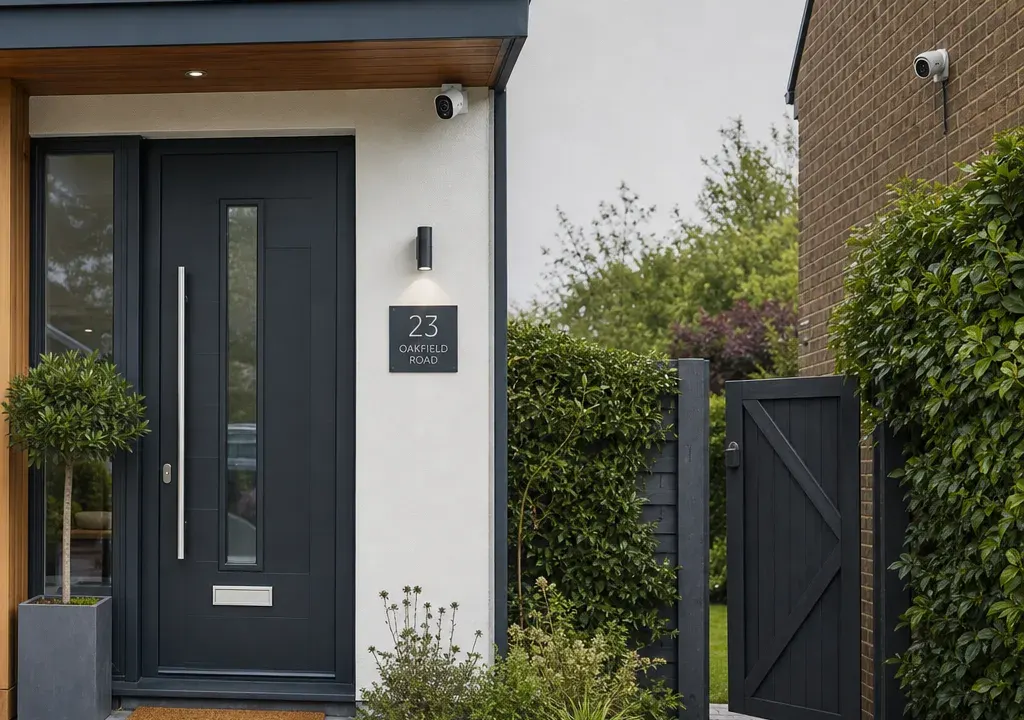
Wired and wireless Surveillance Cameras can both be sensible buys, but they solve slightly different problems. A wired set-up tends to suit planned, long-term coverage where cabling and recording equipment are part of the installation. A wireless camera is often more appealing when you want simpler placement, fewer visible cables or an easier way to cover a rented property, shed, side gate or hallway.
The important detail is that “wireless” does not always mean cable-free. Many wireless cameras connect over Wi-Fi but still need mains power, while some use batteries or solar support. Equally, “wired” can mean wired power, wired data, or both. Before comparing products and offers, decide what you need the camera to do, where it will sit and how you want footage stored.
The right choice usually begins with placement. An indoor camera in a hallway or living space is a different purchase from a camera watching a driveway, back gate or business entrance. Indoor use often prioritises compact design, flexible positioning and straightforward app access. Outdoor use places more emphasis on mounting, weather exposure, power routing and whether the field of view covers the area you actually care about.
If you only need to cover one room or an occasional entry point, a simple wireless camera may be enough. In the supplied catalogue, TP-Link Tapo models such as the C100 and C200 appear as value-led consumer camera options, which is the sort of product many shoppers compare first for basic home monitoring. If you want permanent coverage of outdoor areas, you may find yourself comparing bullet-style cameras, spotlight cameras, doorbell cameras, solar-assisted models and network recording equipment instead.
Think about sightlines before features. A camera placed too high may miss faces; one placed too low may be easier to tamper with; one aimed at a busy public area may create unnecessary alerts. The practical question is not simply wired or wireless, but whether the camera can be placed in the right position without creating an installation problem.
Power is often the deciding factor. A wired camera can be more convenient once installed because you are not thinking about battery charging. The compromise is that you may need a suitable power route, a professional-looking cable run or extra installation accessories. Wired power makes most sense where the camera position is fixed and you do not expect to move it.
Wireless cameras can be more flexible, but check how they are powered. A Wi-Fi camera plugged into the wall is still dependent on a nearby socket. A battery camera reduces cabling, but you need to consider charging access and how often the camera may be triggered. A solar panel model, such as the TP-Link Tapo C460 Kit named in the catalogue, points to another route for locations where running a permanent cable may be awkward, although suitability depends on placement and light exposure.
For rented homes or quick installations, wireless power options can be attractive because they reduce disruption. For long-term use, especially where access is awkward, a wired power solution may be less hassle over time. When comparing offers, do not just compare headline price; compare the total set-up, including mounts, housings, spare batteries, charging arrangements and any extras required for a neat installation.
Connectivity is separate from power. A wireless security camera usually sends video over Wi-Fi, which makes installation easier but depends on signal strength. If the camera is going on an exterior wall, in a garage or at the far end of a garden, your home Wi-Fi may not be as strong there as it is beside your router. A camera that looks good on paper can still disappoint if the network is weak where you need it.
Wired connectivity, such as Ethernet, is generally chosen for more permanent systems. It can be particularly relevant when comparing multi-camera set-ups or recorders. The TP-Link VIGI NVR1008H in the supplied product list is an example of a network video recorder, which is the kind of item shoppers may compare when they want centralised recording rather than a single standalone camera. Synology also appears in the catalogue with the BC500, suggesting there are more system-focused options as well as simple consumer cameras.
If you already use a particular app or smart home ecosystem, brand availability matters. Ring products such as the Spotlight Cam Pro and Video Doorbell Pro 2 appeal to shoppers comparing door and entrance monitoring, while Eufy, TP-Link, IMOU, Synology and Hikvision sit in different parts of the market. The best-value choice is often the one that fits your existing set-up, not necessarily the cheapest camera in isolation.
Installation can be as important as image specification. A simple freestanding indoor camera can be set up quickly and moved when needed. A pan-and-tilt style camera may suit a room where you want adjustable coverage. A doorbell camera is designed around the front entrance and may be preferable if deliveries and callers are the main concern. A spotlight camera can suit shoppers who want a visible deterrent-style product near an entry point, though you should check the exact power and mounting requirements before buying.
Mounted outdoor cameras require more planning. Bullet-style models, housings and brackets can make the installation more permanent, but they also introduce compatibility questions. The supplied catalogue includes Hikvision mounts and housings as well as cameras, which is a reminder that Accessories for Surveillance Cameras are not an afterthought. A low-cost camera can become less good value if you later discover you need extra mounting hardware or a different junction box.
Before buying, check what is included in the box and what you may need separately. Look for mounting plates, fixings, power adapters, cables, housings and any required recording hardware. If the product description is unclear, compare another offer rather than assuming everything needed for installation is included.
Recording is where many buyers underestimate the difference between camera types. Some cameras are designed mainly for app viewing and alerts. Others support local storage, cloud subscriptions or recording to a network video recorder. The best choice depends on whether you need occasional clips, continuous recording, multiple cameras in one place, or a system that can be managed centrally.
Cloud recording can be convenient, but it may involve ongoing costs and account requirements, so check the current terms before committing. Local storage may reduce dependence on subscriptions, but you should consider how footage is accessed, how much capacity is needed and what happens if the camera itself is damaged or removed. NVR-based recording can make sense for a more serious multi-camera arrangement, but it adds equipment cost and installation complexity.
A good comparison is not simply camera versus camera. It is camera plus recording method plus any future costs. If two Surveillance Cameras look similar, the one with the recording option that matches your habits may be the better buy.
The supplied product candidates show a wide spread of catalogue pricing, from low-cost accessories and entry-level cameras through to more expensive cameras and recorder equipment. Several items also show large discount signals, but discounts change and should not be treated as proof that a product is the right fit. A heavily reduced camera can be poor value if it needs accessories you did not budget for, lacks the recording method you want or will not work well in the intended location.
When comparing products and offers, separate the price of the camera from the cost of the set-up. For a wireless camera, that might include batteries, solar accessories, charging convenience or cloud recording. For a wired camera, it may include cabling, mounting hardware, an NVR, storage drives or professional installation. Accessories from brands such as Hikvision in the catalogue show why installation parts can matter just as much as the camera itself.
Brand range is also worth weighing. TP-Link appears several times in the supplied options, from Tapo cameras to VIGI recording equipment, while Ring, Eufy, IMOU, Synology and Hikvision give shoppers alternatives across doorbell, add-on, bullet-style, system and accessory-led choices. A brand with the right accessories and compatible products may offer better long-term value if you plan to expand later.
Choose a wireless security camera if you want easier placement, minimal cabling and the flexibility to move or adjust the camera later. It is often the more convenient route for flats, rented homes, single-room monitoring, side passages where wiring is awkward, or buyers who want to get started with one camera before expanding. Pay close attention to Wi-Fi strength, power source and recording terms.
Choose a wired security camera if the position is permanent, you want a neater long-term installation, or you are building a multi-camera system with central recording. It can be the better route for larger homes, small businesses, driveways, garden boundaries and areas where regular battery access would be inconvenient. The trade-off is more planning, more installation effort and potentially more supporting equipment.
If you are unsure, map out the camera position first. Check power access, network signal, where footage will be stored and whether you need accessories. Then compare the Surveillance Cameras available by brand, installation type and total set-up cost, rather than buying on discount percentage alone.
Not always. Many wireless cameras use Wi-Fi for connectivity but still need mains power. Some models use batteries or solar support, so always check the power source before buying.
Wired cameras can suit permanent installations and central recording, while wireless cameras are usually easier to place. The better option depends on location, power access, Wi-Fi strength, recording needs and installation effort.
Not for every camera. An NVR is usually considered for multi-camera or more permanent recording set-ups. Many single-camera systems use app-based viewing, local storage or cloud recording instead, depending on the model.
Compare power source, connectivity, indoor or outdoor suitability, mounting requirements, recording options, compatible accessories, brand ecosystem and the full set-up cost rather than only the camera price.
It is worth checking before you order. Mounts, housings, cables, junction boxes or recording equipment may be needed for some installations, and Accessories for Surveillance Cameras can affect the total cost and fit.
Wired and wireless security cameras both have a place. Wireless models are often the easier first purchase, especially where flexibility matters. Wired options are usually more attractive when you want a fixed, long-term set-up with dependable power and potentially centralised recording.
The safest buying approach is to compare the full system, not just the camera. Decide where it will go, how it will be powered, how it will connect, how footage will be stored and which accessories are needed. Once those answers are clear, the right wired or wireless option becomes much easier to spot.
