
Loading buyer guide
Hurry, don't miss savings on selected furniture & more.* Shop all offers
TP-Link Tapo and Eufy are both popular names in Surveillance Cameras, but they are not always aiming at the same buyer. Compare the storage set-up, camera type, power needs and any system requirements before deciding which offer is genuinely better value.
Use our barcode scanner to match products instantly to find the best prices, find products with ease using our voice search and build wish lists and your favourites at the click of a button.
Ring vs Google nest security cameras: which ecosystem suits your home?
Ring and Google Nest are often compared by shoppers who already own smart speakers, displays or doorbells. The better choice is usually the one that fits your existing home setup, gives you the camera style you need and keeps ongoing costs predictable.
Security camera brands compared: Ring, Eufy, Reolink, Tapo and Blink
Ring, Eufy, Reolink, Tapo and Blink all sit in the same broad Surveillance Cameras market, but they are not interchangeable buys. The right choice depends on whether you value a doorbell-led setup, battery convenience, higher-resolution outdoor coverage, lower entry cost, local recording options or the best offer available today.
Blink vs Tapo security cameras: best for budget buyers
Blink and Tapo both appeal to shoppers who want home security without overspending, but they suit different buying habits. Blink is often attractive if you want simple wire-free cameras and an Amazon-connected setup, while Tapo is especially strong when you are comparing low-cost indoor cameras, mains-powered options and models with flexible storage choices.
Battery vs mains powered alarms: which should you choose?
Alarm choice is not just about the cheapest unit on the shelf. The right power type affects where it can be fitted, how often you will need to maintain it and what you may spend over the product’s listed life.
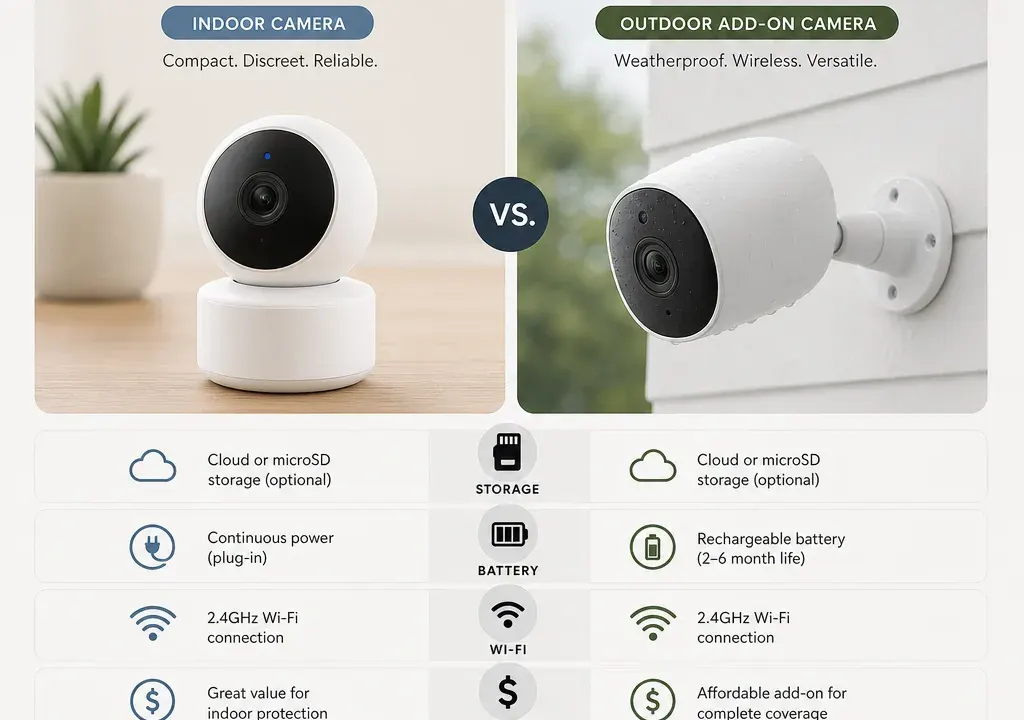
TP-Link Tapo and Eufy often appeal to the same broad shopper: someone who wants home monitoring without stepping into a full professional security installation. The difference is in the details. Tapo is frequently attractive when you are comparing budget-friendly indoor cameras, pan-and-tilt models and spec-led options, while Eufy is often considered by shoppers who care about how footage is stored and how cameras fit into an existing home security setup.
For this guide, the supplied catalogue snapshot includes TP-Link Tapo models such as the Tapo C100, Tapo C200 1-pack and Tapo C460 KIT 4K 8MP Solar Panel Security Camera, alongside the Eufy S210 Add-On Camera. Those products give useful comparison context, but availability and offers can change, so treat any deal as something to check against today’s live Surveillance Cameras listings.
Choose TP-Link Tapo if you want a wide spread of camera types to compare, particularly compact indoor cameras and spec-focused options. In the supplied product context, Tapo appears across several different use cases: the C100 as a simple indoor-style camera, the C200 as a pan-and-tilt-style option, and the C460 KIT as a higher-spec outdoor solar kit with 4K 8MP wording in the product title.
Choose Eufy if you are already building around Eufy equipment or you are specifically looking at an add-on camera. The Eufy S210 Add-On Camera name is important: before buying, check what it needs to work with, whether that means a compatible base station, app set-up or existing system components. An add-on can be excellent value for the right household and frustrating if you buy it as a standalone camera by mistake.
If you are starting from nothing and want the lowest initial outlay, Tapo’s catalogue spread may be easier to compare. If you already own compatible Eufy kit, an Eufy add-on may be the more logical upgrade even if the headline price is higher than some entry-level Tapo models.
Storage is one of the biggest differences between security camera ecosystems, and it can change the real cost of ownership. Do not choose purely by the camera price until you know where clips are saved, whether local storage is supported, whether a subscription is optional or required for the features you want, and whether storage hardware is included or bought separately.
With Tapo, check each model individually. Some shoppers look at Tapo for flexible everyday monitoring, but storage options can vary by model and by feature. For example, an indoor camera used to check a hallway has different storage needs from a 4K outdoor camera covering a driveway. Higher-resolution recording can also use more storage, so a camera with sharper footage may need a more considered storage plan.
With Eufy, the key buying question is compatibility. The supplied Eufy option is an add-on camera, so it is especially important to confirm how footage is recorded and what existing equipment it connects to. If it depends on another Eufy device or hub for the features you want, include that in your value comparison rather than treating the camera alone as the whole purchase.
A good storage comparison is not simply cloud versus local. Ask: how many days of footage do you need, do you want continuous recording or motion clips, how easy is it to export footage, and what happens if the internet connection drops? The better camera is the one that matches your recording habits, not just the one with the most appealing offer label.
The clearest difference in the supplied catalogue context is that Tapo gives you several spec directions to compare. The TP-Link Tapo C100 looks like the type of product shoppers consider for straightforward indoor coverage. The Tapo C200 1-pack is a step to compare if you want a camera that can cover more of a room rather than pointing at one fixed area. The Tapo C460 KIT 4K 8MP Solar Panel Security Camera is a more specification-led option for outdoor coverage where resolution, power and mounting position matter more.
The Eufy S210 Add-On Camera needs a different lens as a buying decision. Its value depends less on being compared like-for-like with the cheapest Tapo indoor camera and more on whether it expands a Eufy setup you already use. If the camera is adding coverage to a garden, side path or outbuilding, check weather suitability, battery or wired requirements, night recording, field of view and mounting accessories before comparing the price.
Resolution is worth comparing, but it should not be the only spec. A 4K or 8MP camera may capture more detail, but the usefulness depends on lens angle, night performance, placement and storage. For a small indoor room, a cheaper lower-resolution model may be perfectly sensible. For a driveway or gate, sharper footage may be worth paying for if the rest of the setup supports it.
Also check audio, motion detection settings, privacy controls, app notifications and whether the camera works with your preferred smart home devices. These features can be more important day to day than a headline resolution figure.
Power type is where a cheap camera can become less convenient than it first appears. Mains-powered indoor cameras are usually best when there is a socket nearby and you do not want to think about charging. Battery or solar-supported outdoor cameras can be tidier where running a cable is awkward, but you need to think about sunlight, mounting height and maintenance access.
In the supplied examples, the Tapo C460 KIT includes solar panel wording in the title, so it is likely to appeal to shoppers trying to reduce charging hassle outdoors. That does not remove the need to check the exact installation requirements. You still need a suitable mounting spot, a reliable Wi-Fi signal and a field of view that covers the area you care about.
The Eufy S210 Add-On Camera may be convenient if it slots into an existing system, but that is exactly what you need to confirm. Add-on cameras can be poor value if you need extra equipment to make them useful. They can be excellent value if you already own the required parts and just need another camera position.
Do not forget Accessories for Surveillance Cameras. Mounts, housings, longer cables, memory cards and brackets can affect the final spend and whether the camera is easy to fit neatly.
Large discount percentages can be useful signposts, but they should not decide the purchase on their own. The supplied catalogue data shows strong offer signals across several Surveillance Cameras, including TP-Link Tapo models and the Eufy S210 Add-On Camera. However, the best value camera is the one that solves your actual monitoring problem with the fewest compromises.
For a single indoor room, compare the Tapo C100 and Tapo C200 style of purchase carefully. A lower-cost fixed camera may be enough if it points at a doorway, pet area or garage entrance. A pan-and-tilt-style option may be worth more if you want broader room coverage from one position.
For outdoor monitoring, compare the Tapo C460 KIT and the Eufy S210 Add-On Camera by total setup needs. Does one include more of what you need in the box? Does one require extra storage equipment, a base station, a subscription, a mount or a better Wi-Fi extender? Those items can change the value calculation quickly.
Also consider retailer availability and returns information when comparing offers. A slightly cheaper deal is not automatically better if the listing is unclear about the exact model, included accessories or compatibility.
Buy TP-Link Tapo if you are price-sensitive, want to compare several camera styles, or need a straightforward first camera for indoor or outdoor monitoring. Tapo is particularly easy to shortlist when you want to compare fixed indoor, moving indoor and higher-spec outdoor options within the same broad brand family.
Buy Eufy if you are already invested in Eufy equipment or you have confirmed that the add-on camera works with the system you want. It may be the more efficient choice when you are expanding coverage rather than starting from scratch.
If you are unsure, start with the location: one room, front door, driveway, garden, garage or side path. Then compare only the cameras that suit that location. That approach avoids being pulled between a very cheap indoor camera and a more capable outdoor add-on that solves a completely different problem.
In the supplied catalogue snapshot, some TP-Link Tapo models appear at lower listed prices than the Eufy S210 Add-On Camera. That does not automatically make Tapo better value. Compare the full setup, including storage, accessories, power needs and any system requirements.
Check the product listing carefully before buying. Because it is described as an add-on camera, it may be intended to work with existing compatible Eufy equipment. If you are starting from scratch, confirm what else is needed.
Only if you need the extra detail and the camera suits the location. A 4K outdoor camera may make sense for a driveway or garden, while a simpler indoor camera can be better value for a hallway, pet area or small room.
Look at where footage is stored, whether recording needs a subscription, whether local storage is supported, and whether storage hardware is included. The right answer depends on how much footage you want to keep and how often you expect to review it.
TP-Link Tapo and Eufy are not simply “cheap versus expensive” choices. Tapo is easier to compare across a wider spread of entry-level and specification-led cameras, while Eufy becomes more compelling when its add-on format fits equipment you already own.
Before choosing, compare live Surveillance Cameras offers by storage, power, compatibility and included accessories. A good deal is not just the lowest price; it is the camera that covers the right area, records in the way you prefer and avoids surprise extras later.
