
Loading buyer guide
Hurry, don't miss savings on selected furniture & more.* Shop all offers
A used VR headset is only good value if it still works with the games, apps, controllers and replacement parts you expect. Here’s how to compare older models against new offers and essential VR Accessories before you buy.
Use our barcode scanner to match products instantly to find the best prices, find products with ease using our voice search and build wish lists and your favourites at the click of a button.
HTC vive vs Meta quest: which VR ecosystem suits you?
Choosing between HTC Vive and Meta Quest is really a choice between two VR habits: a more expandable, PC-friendly setup or a simpler all-in-one route. The better option depends on how much space, hardware and accessory spending you are comfortable with.
Meta quest 3 vs Meta quest 3S: which should you buy?
Meta Quest 3 is the more premium choice, while Meta Quest 3S is built around better value. The right pick depends on how much you care about sharper optics, storage, mixed reality convenience and the total cost once accessories are included.
VR headset resolution and refresh rate explained
Resolution, refresh rate and panel type can change how sharp, smooth and comfortable a VR headset feels, but those specs only matter when they match the way you plan to use it. Here’s how to compare VR Virtual Reality listings with a clearer eye for value.
Meta quest vs PlayStation VR: which VR platform is right for you?
Choosing between Meta Quest and PlayStation VR is less about one headset being universally better and more about the kit you already own, the games you want and the extras you may need to budget for.
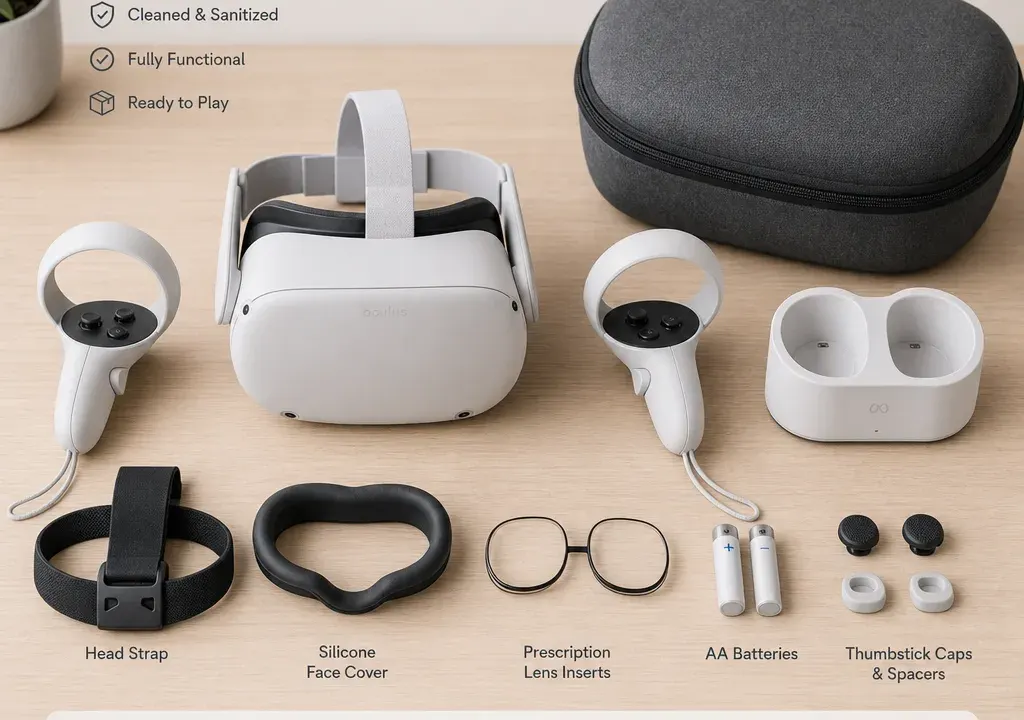
Buying an older or used VR headset can make sense, especially if you are trying VR for the first time or replacing a damaged unit. The risk is that the headset price is only part of the real cost. Controllers, tracking equipment, prescription-friendly fittings, straps, cases and chargers can quickly change the value of the deal.
Current VR Virtual Reality catalogue data shows why comparison matters. Alongside VR Headsets, there are many VR Accessories for specific platforms, including Meta Quest 3S charging stations, Meta Quest 3 comfort straps, Quest-compatible carry cases, HTC VIVE tracking products, PS VR2 glasses protectors and phone-based viewers. That range is useful, but it also means you need to check exact compatibility before assuming an accessory will solve a problem.
Before comparing any offer, confirm the precise model name and generation. A listing that says “Quest”, “VIVE” or “VR headset” is not enough. Accessories are often built around a specific version, and small naming differences can matter.
For example, catalogue accessories may reference Meta Quest 3S, Meta Quest 3, Quest 2 or Oculus 2 in the product title. A carry case might list several compatible models, while a charging station or head strap may be more specific. Treat every older headset as a platform choice, not just a standalone gadget.
Ask the seller for the model number if it is not shown clearly. Check whether the controllers are original, whether any base stations or trackers are required, and whether the headset needs a compatible PC, console or phone to be useful. If those details are vague, compare the used offer against clearer new or refurbished alternatives before committing.
A cheap older headset is poor value if it does not work with the content you want. Some VR systems are standalone, some rely on a games console, some need a PC, and some phone viewers are closer to simple 3D holders than full VR gaming systems.
Phone-based viewers such as Google Cardboard-style glasses or anti-blue-light phone headsets can be inexpensive entry points, but they should not be compared directly with full VR Headsets. They usually suit a different type of use, such as casual viewing or simple app experiences. If you want motion controllers, room-scale tracking or a modern app library, compare against headset platforms designed for that purpose.
For PC-based or tracking-heavy systems, check the wider ecosystem. Current catalogue examples include HTC VIVE base stations and VIVE tracker kits, which suggests that some setups may involve separate tracking hardware. If a used headset is missing a required tracking component, factor that into the total ownership cost before deciding it is cheaper than a newer option.
Used VR often becomes expensive because of small extras. A missing charger, uncomfortable original strap, worn facial interface, absent case or faulty controller part can turn a low purchase price into a drawn-out parts hunt.
Current catalogue data highlights common add-ons shoppers compare: charge stations for Meta Quest 3S, comfort head straps for Meta Quest 3, adjustable head straps for older Quest-style naming, carry cases for Meta Quest 3S, Quest 3 and Quest 2, PS VR2 glasses protectors, tracking straps and replacement-style joystick parts for Meta VR controllers. These are exactly the kinds of items to look up before buying used.
Make a simple ownership list: headset, controllers, charging solution, head strap, case, glasses spacer or protector if needed, tracking equipment and any likely replacement parts. Then compare the total with a new-price alternative in VR Virtual Reality. A used bundle only really wins if the complete setup is still sensible after those extras are included.
Controllers take more abuse than headsets. Before buying, ask whether both controllers pair properly, hold charge, track consistently and register thumbstick movement without drift. If the seller cannot show this, assume there may be a repair or replacement cost.
Catalogue examples such as 3D analogue joystick parts for Meta VR controllers show that small repair components may be available, but availability is not the same as an easy fix. A part may suit only certain controller versions, and fitting it may not be realistic for every buyer. Unless you are comfortable with repairs, compare a questionable used controller set against a cleaner bundle or a newer headset offer.
Tracking also matters. With systems that use external base stations or dedicated trackers, confirm whether everything required is included. A headset without the right tracking accessories may not be ready to use, even if the headset itself powers on.
Some older or specialist VR products can be appealing because they appear heavily reduced or less common. The key question is whether they fit your actual use. A product such as Lenovo ThinkReality VRX, for example, appears in catalogue data as a named headset option, but buyers should still check the intended platform, app support, account requirements and accessory ecosystem before treating it as a general home entertainment choice.
Discontinued models can still be useful if you already know the ecosystem and have access to compatible content. They are riskier for first-time buyers because help guides, replacement accessories and platform updates may be harder to assess. Avoid assuming that a higher original price or specialist branding automatically makes an older model better for gaming, fitness, media or family use.
When comparing older VR Headsets, look for signs of an active accessory market. If you can easily find compatible straps, cases, charging solutions and controller parts, ownership may be simpler. If most accessories are unclear, scarce or designed for different generations, build that uncertainty into your decision.
A used headset bundle should be compared against what you can buy now, not what the headset originally cost. Current catalogue signals show notable discounts across several VR Accessories, from straps and charge stations to cases and smaller parts. Those discounts can make it easier to refresh a supported headset, but they can also make a new or cleaner setup more attractive.
Do not focus only on the headset price. Compare the used bundle with three totals: the used headset as sold, the used headset plus essential accessories, and a new or newer alternative with fewer missing pieces. The best-value choice is often the one with the least uncertainty, not the lowest first payment.
If two options are close, favour the setup with clearer compatibility, readily available accessories and fewer signs of wear. VR is an interactive product; discomfort, poor tracking or unreliable controllers can ruin the experience more quickly than a small saving can justify.
Ask for photos of the lenses, head strap, facial area, controllers, ports and any tracking hardware. Lens scratches, damaged cables, cracked rings on controllers and missing battery covers are all worth spotting before you travel or pay.
Ask whether the headset has been factory reset, whether all included parts are original or third-party, and whether the seller can demonstrate the headset reaching its home screen. For platform-tied headsets, check that it is not locked to an account you cannot access.
Finally, ask what is not included. A listing may show a headset but omit the charger, carry case, controllers or tracking equipment. Once you know the gaps, you can compare suitable VR Accessories and decide whether the total still makes sense.
It can be worth buying if the headset is compatible with the content you want, includes the essential controllers or tracking hardware, and has affordable compatible accessories available. If key parts are missing or the platform is unclear, compare it with newer VR Headsets before deciding.
Common items include a charging solution, head strap, carry case, glasses spacer or protector, controller parts and tracking accessories where required. Check that each accessory matches the exact headset generation, not just the general brand name.
Only if your expectations match the product. Phone-based VR viewers can be low-cost and simple, but they are not the same as full VR systems with dedicated tracking, controllers and platform stores. Compare them by intended use rather than price alone.
Search for accessories and parts using the exact model and generation. Current catalogue examples include controller joystick parts, head straps, carry cases, base stations and trackers, but each may fit only certain systems. If compatibility is not clearly stated, treat it as a risk.
The biggest warning sign is an incomplete or vague bundle. If the seller cannot confirm the exact model, controller condition, included tracking hardware and reset status, the apparent saving may disappear once you add missing parts or replace faulty accessories.
A used or older VR headset should be judged as a complete setup, not a single device. Identify the exact model, check the platform, confirm the controller and tracking requirements, then compare the accessories you may need against new-price alternatives in VR Virtual Reality.
The strongest used buy is usually the one with clear compatibility, a complete bundle and a healthy accessory ecosystem. If you have to guess whether a strap, charger, tracker or controller part will fit, pause and compare more options before buying.
