
Loading buyer guide
Hurry, don't miss savings on selected furniture & more.* Shop all offers
Meta Quest suits shoppers who want a more self-contained VR route, while PlayStation VR makes most sense if your gaming already revolves around a compatible PlayStation console. Here’s how to compare ecosystems, bundles, accessories and value before you buy.
Use our barcode scanner to match products instantly to find the best prices, find products with ease using our voice search and build wish lists and your favourites at the click of a button.
What to check before buying a used or older VR headset
Older VR can look like a bargain until you price up controllers, straps, tracking parts and platform support. Use current catalogue signals to compare the headset with the accessories and alternatives you may need afterwards.
HTC vive vs Meta quest: which VR ecosystem suits you?
Choosing between HTC Vive and Meta Quest is really a choice between two VR habits: a more expandable, PC-friendly setup or a simpler all-in-one route. The better option depends on how much space, hardware and accessory spending you are comfortable with.
Meta quest 3 vs Meta quest 3S: which should you buy?
Meta Quest 3 is the more premium choice, while Meta Quest 3S is built around better value. The right pick depends on how much you care about sharper optics, storage, mixed reality convenience and the total cost once accessories are included.
VR headset resolution and refresh rate explained
Resolution, refresh rate and panel type can change how sharp, smooth and comfortable a VR headset feels, but those specs only matter when they match the way you plan to use it. Here’s how to compare VR Virtual Reality listings with a clearer eye for value.
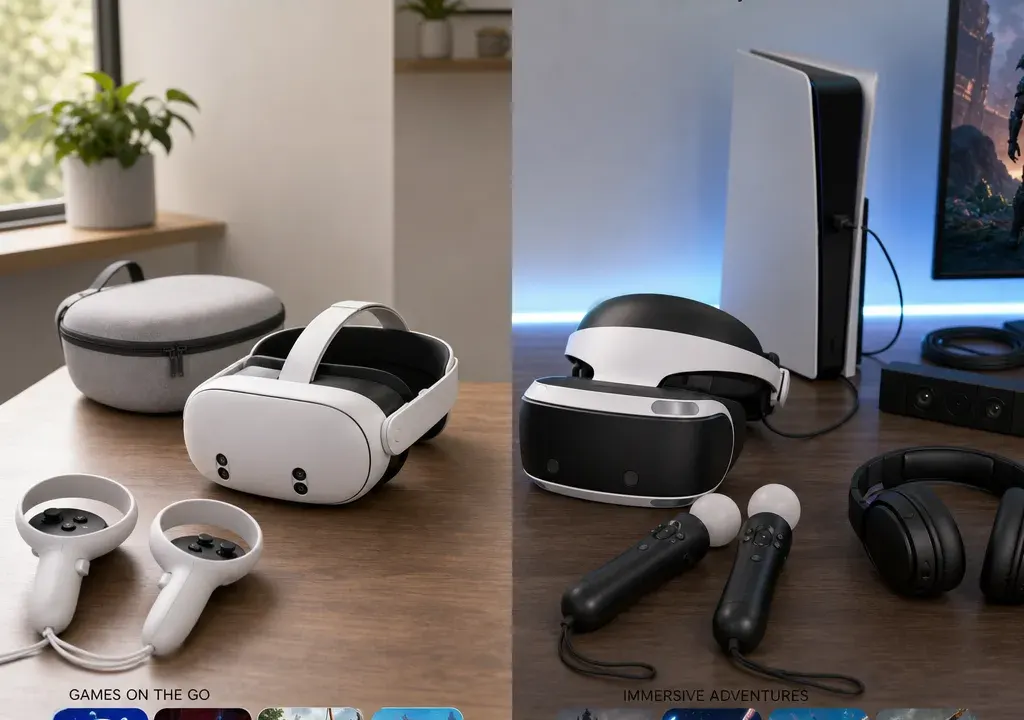
Meta Quest and PlayStation VR appeal to slightly different buyers. One tends to suit people who want a more flexible, self-contained route into VR, while the other is more closely tied to console gaming and the PlayStation ecosystem.
The right choice depends on what you already own, how you plan to play, and whether you are likely to spend more on accessories, charging docks, straps, cases or game purchases after the headset itself. Comparing VR Virtual Reality products and offers side by side can help you spot the real cost of ownership rather than focusing only on the headline headset price.
This guide is based on product catalogue data, value signals, retailer availability and merchandising context. It does not imply hands-on testing.
If you already own a compatible PlayStation console and buy most of your games there, PlayStation VR may feel like the more natural extension of your current setup. You keep your gaming activity in one familiar ecosystem, and your decision becomes more about headset compatibility, available games and whether the bundle includes the hardware you need.
Meta Quest is usually the more independent choice. It is designed around a standalone headset experience, with the option to explore compatible PC VR use depending on the model, software and your computer setup. That makes it attractive if you do not want your VR purchase to depend entirely on a console.
For buyers starting from scratch, the platform question matters more than the headset name. A console-tied route can be excellent if you specifically want PlayStation VR games, but the console requirement can add to the overall cost if you do not already have the right hardware. A standalone route can reduce the number of core devices needed, but you may still spend on accessories, storage choices, apps and comfort upgrades.
Price comparisons can be misleading if you compare only the headset box. With PlayStation VR, check which console generation the headset is designed for, what connectors or adapters are required, and whether the games you want are compatible with that specific headset. Do not assume every PlayStation VR title works across every PlayStation VR device.
With Meta Quest, check whether you plan to use it purely as a standalone headset or with a PC. Standalone play keeps the setup simpler, while PC VR use may involve checking your computer’s graphics capability, connection method and software compatibility. If your PC is not already suitable, the cost of upgrading can change the value calculation considerably.
A good buying approach is to list what you already own first: console, gaming PC, suitable play space, headphones, charging options and storage. Then compare only the extra items you genuinely need to buy.
Bundles are especially important in VR because small missing items can quickly become extra purchases. Before choosing between Meta Quest and PlayStation VR, check whether the listing includes controllers, required cables, charging accessories, straps, any headset-specific adapters and any bundled games or trial content.
A cheaper-looking offer may not be better value if it lacks hardware you will need immediately. Similarly, a higher-priced bundle can be worthwhile if it includes accessories you would otherwise buy separately, but only if those extras are useful for your setup.
When comparing offers in VR Headsets and VR Accessories, treat bundled content carefully. A game bundle has value only if you actually want the game. A carry case matters more if you plan to travel with the headset. A comfort strap matters more if several people will use the headset or you expect longer sessions.
The strongest reason to choose PlayStation VR is usually a preference for PlayStation gaming. If your household already buys PlayStation titles, uses PlayStation accounts and wants VR experiences associated with that platform, the decision may be straightforward.
Meta Quest is often better suited to buyers who want a broader, headset-led VR experience without anchoring everything to a console. It can be a good fit for casual VR, social experiences, fitness-style apps, family use and buyers who want fewer living-room cables. Availability varies by title and model, so check each game before assuming it will work.
For families, it is worth thinking about who will use the headset most. A dedicated console gamer may prefer PlayStation VR. A mixed household that wants quick sessions, demonstrations and room-to-room flexibility may find the Meta Quest approach easier to live with.
Accessory costs are easy to overlook. Catalogue examples show how varied the VR accessory market can be: a Stealth Charge Station for Meta Quest 3S, a KIWI Design K4 Comfort Head Strap for Meta Quest 3, a Digicharge carry case for Meta Quest models, and a Sodial eyeglasses frame protector case for PS VR2 all point to the kinds of extras shoppers may compare after choosing a platform.
The exact live price and discount can change, so use these as comparison prompts rather than fixed buying advice. Ask whether you need a charging dock, a more comfortable head strap, lens protection, a storage case, replacement controller parts or tracking accessories. Some buyers will be happy with the standard kit; others may find comfort and storage upgrades make the headset more usable.
Meta Quest has a particularly visible accessory ecosystem in many catalogues, with straps, docks and cases commonly compared. PlayStation VR buyers should still check for headset protection, cable management, prescription or glasses-related accessories and controller charging options where relevant.
Large discounts can be useful, but they should not be the only reason to buy. In the supplied VR Virtual Reality catalogue snapshot, accessory listings show a wide range of promoted reductions, from low-cost controller and strap parts to higher-value tracking hardware. Those signals can help you spot categories where deals may be available, but the live retailer price, stock and included items should always be checked before purchase.
Compare like with like. A headset-only listing, a full bundle and an accessory pack are not interchangeable. If one offer appears cheaper, check whether it includes the headset, controllers, cables and any required platform hardware. For accessories, check the exact headset model named in the title, because Meta Quest 2, Meta Quest 3, Meta Quest 3S and PlayStation VR models may not use the same fit or connector.
A sensible comparison is the total setup cost: headset plus required console or PC, plus games, plus comfort or charging accessories you are likely to buy within the first few months.
Meta Quest is likely to suit shoppers who want a self-contained VR experience, do not necessarily want to buy or use a console, and value flexibility. It is also worth considering if you want to compare a broad range of VR Accessories such as straps, charging stations and carry cases.
It may be the better direction if you want quick setup, shared household use or the option to explore PC VR later, provided your chosen model and computer setup support the way you want to play.
Before buying, check storage options, game compatibility, comfort, battery and charging arrangements, and whether the bundle includes everything you expect.
PlayStation VR is likely to suit shoppers who already own the right PlayStation console and want VR to feel like part of their console gaming setup. It is also a stronger fit if the games you most want are tied to the PlayStation ecosystem.
It may not be the cheapest route if you are starting without the required console, so include that in your comparison. Also check whether you are looking at PlayStation VR or PS VR2 accessories, because compatibility matters.
Before buying, confirm the headset version, console requirement, included controllers, cable requirements, game compatibility and whether any extras such as lens protection or charging accessories would be useful.
Choose Meta Quest if you want a more standalone headset experience, value flexibility, and do not want your VR setup to depend mainly on a PlayStation console.
Choose PlayStation VR if you already play on a compatible PlayStation console and the VR games you want are available for that specific PlayStation VR platform.
Whichever way you go, compare the complete package: headset, required hardware, included controllers, games, comfort accessories, charging, storage and any bundle extras. That gives you a clearer view of value than the headline offer alone.
Not always. The better comparison is total setup cost. Meta Quest may require fewer core devices if you want standalone VR, while PlayStation VR can be better value for someone who already owns the required console. Accessories, games and bundles can change the final cost.
Meta Quest is designed around standalone use, so a console is not normally the centre of the setup. Some buyers also explore compatible PC VR use, but that depends on the headset, software and computer capability.
Yes, PlayStation VR is built around the PlayStation ecosystem. Check the exact headset model and the console it requires before buying, as compatibility differs between versions.
They can be, but only if the included extras are useful. Compare the bundle contents with what you would otherwise buy separately, such as controllers, games, charging accessories, comfort straps or protective cases.
Comfort straps, charging solutions, carry cases and lens or glasses-related protection are common early add-ons. The right choice depends on your headset model, how long you play for and whether the headset will be shared or transported.
Meta Quest and PlayStation VR are not simply two versions of the same purchase. Meta Quest is generally the more flexible, headset-led route, while PlayStation VR makes most sense when it fits into a PlayStation setup you already use and enjoy.
Before deciding, compare the ecosystem, required hardware, included kit, game library and likely accessories. The best VR Virtual Reality deal is the one that gives you the setup you will actually use, not just the largest-looking discount.
