
Loading buyer guide
Hurry, don't miss savings on selected furniture & more.* Shop all offers
HTC Vive and Meta Quest can both lead to excellent VR setups, but they suit different buyers. Here’s how to compare headset type, tracking, accessories and retailer offers before you commit.
Use our barcode scanner to match products instantly to find the best prices, find products with ease using our voice search and build wish lists and your favourites at the click of a button.
What to check before buying a used or older VR headset
Older VR can look like a bargain until you price up controllers, straps, tracking parts and platform support. Use current catalogue signals to compare the headset with the accessories and alternatives you may need afterwards.
Meta quest 3 vs Meta quest 3S: which should you buy?
Meta Quest 3 is the more premium choice, while Meta Quest 3S is built around better value. The right pick depends on how much you care about sharper optics, storage, mixed reality convenience and the total cost once accessories are included.
VR headset resolution and refresh rate explained
Resolution, refresh rate and panel type can change how sharp, smooth and comfortable a VR headset feels, but those specs only matter when they match the way you plan to use it. Here’s how to compare VR Virtual Reality listings with a clearer eye for value.
Meta quest vs PlayStation VR: which VR platform is right for you?
Choosing between Meta Quest and PlayStation VR is less about one headset being universally better and more about the kit you already own, the games you want and the extras you may need to budget for.
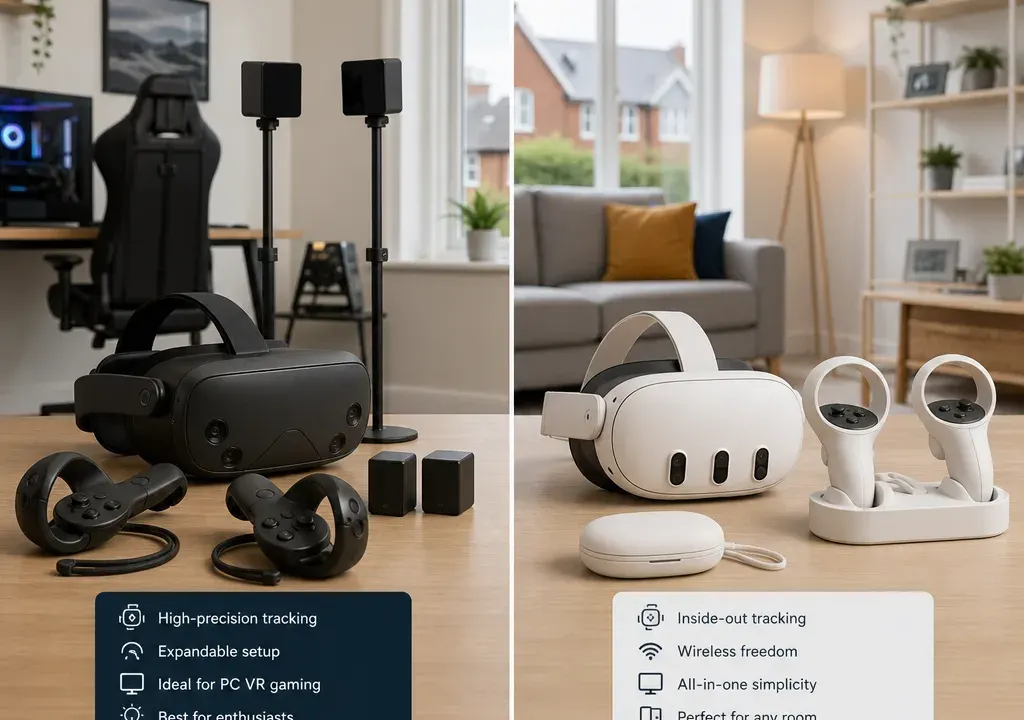
HTC Vive and Meta Quest are often compared as if they are simply two headset brands, but the decision is broader than that. You are choosing an ecosystem: how the headset runs, how it tracks movement, which accessories you may add later, and how much effort you want to put into setup.
For many shoppers browsing VR Virtual Reality products, Meta Quest will appeal because of its all-in-one style and wide accessory market. HTC Vive, meanwhile, is often considered by buyers who are more interested in PC VR, tracking expansion or a more modular setup. Neither route is automatically better; the right choice depends on your space, gaming habits and upgrade plans.
This guide uses current catalogue context, retailer availability and value signals to help compare options. It does not imply hands-on product testing, and prices or offers can change, so it is always worth comparing products and offers carefully before buying.
If you want the simplest route into VR, Meta Quest is usually the easier ecosystem to understand. Quest-style headsets are commonly bought as self-contained devices, which makes them attractive for casual gaming, fitness apps, social VR and family use. You can still spend more on comfort straps, charging docks, carry cases and controller parts, but the core appeal is that you are not necessarily building a full PC-based VR space from day one.
HTC Vive is more likely to attract buyers who want a setup they can build around. In the supplied catalogue, HTC examples include tracking-focused products such as a VIVE Ultimate Tracker kit and a VIVE SteamVR Base Station, which points towards an ecosystem where sensors, trackers and accessories can matter just as much as the headset itself.
A useful way to decide is to ask whether you want VR to feel like a console-style purchase or a specialist setup. If you want quick access and fewer decisions, start by comparing Meta Quest VR Headsets. If you are thinking about tracking, PC compatibility and future add-ons, HTC Vive products deserve closer attention.
The biggest practical difference is whether you expect the headset to work mainly on its own or as part of a more powerful setup. Meta Quest products are commonly associated with standalone VR, meaning the headset is designed to handle the experience without a separate gaming PC for many uses. That can reduce clutter and make the first purchase feel less intimidating.
HTC Vive is often associated with PC VR and more specialist use cases, although the exact requirements vary by product. Before buying any HTC Vive headset or accessory, check what hardware it needs, which headset it supports and whether you already own a suitable PC or tracking setup. A low accessory price is not good value if it only works with equipment you do not have.
For UK shoppers, this is where comparison matters. A standalone-style headset may look more expensive upfront than a small HTC accessory, but a PC VR route can involve extra items such as base stations, trackers, cables, mounts or a capable computer. Compare the full setup cost rather than judging one product tile in isolation.
Tracking is one of the main reasons buyers split between these ecosystems. Meta Quest-style setups tend to prioritise convenience, with tracking designed to be practical for home use and quick sessions. For many people playing rhythm games, fitness titles or social apps, that simplicity is a major benefit.
HTC Vive can be more appealing if you are looking at more advanced tracking arrangements. Catalogue examples such as the HTC VIVE SteamVR Base Station and HTC VIVE Ultimate Tracker kit show how the Vive ecosystem can include dedicated tracking hardware. That may suit users interested in room-scale setups, body tracking, simulation or more specialised experiences.
The trade-off is complexity. More tracking hardware can mean more planning, more compatibility checks and more space considerations. Before choosing HTC Vive for tracking expansion, think about where equipment will sit, whether you can leave it set up, and whether the software you want actually benefits from that extra hardware.
VR Accessories are not just nice extras. They can affect comfort, storage, charging and how often you use the headset. In the supplied product set, Meta-related accessories include a charge station for Meta Quest 3S, a comfort head strap for Meta Quest 3, a carry case for Quest models and controller repair-style parts. Those examples show how quickly a seemingly simple headset purchase can turn into a broader accessory ecosystem.
For Meta Quest buyers, the most common accessory questions are practical: do you want a more comfortable head strap, a dock or charging station, a travel case, spare controller parts or lens protection? These purchases may be relatively modest individually, but they should be included in your budget if comfort and convenience matter.
For HTC Vive buyers, accessories may be more central to the setup itself. Base stations and trackers can be part of how the experience works, not merely optional add-ons. That makes compatibility especially important. Check exact model names, supported headset generations and what is included in the box before comparing offers.
VR pricing can be uneven because shoppers are often comparing very different things: full headsets, charging docks, straps, trackers, base stations and small replacement parts. A large discount on a minor accessory should not be compared with a smaller discount on a core headset or tracking kit.
In the catalogue snapshot used for this comparison, low-cost accessories appear alongside higher-ticket tracking hardware. That is useful context, but it is not a final verdict on value. Current retailer prices, availability and discounts can move, so compare the latest offers for the exact product name you want, not just the brand logo.
Look for three things when comparing offers: whether the item is a complete headset or an accessory, whether it is compatible with your model, and whether the saving is meaningful for your intended setup. A cheap strap, case or controller part can be good value if it solves a real problem. A discounted tracker or base station only makes sense if it fits the VR system you are building.
Meta Quest is likely to suit buyers who want a more straightforward entry into VR Virtual Reality. It is a strong fit if you want fewer setup decisions, a headset that feels approachable for mixed household use, or an ecosystem with plenty of everyday accessories such as cases, straps and charging options.
It is also a sensible starting point if you are unsure how often you will use VR. Instead of building a more technical setup straight away, you can begin with the headset and add accessories later if comfort, battery management or storage becomes important.
Before choosing, compare Meta Quest VR Headsets and related VR Accessories together. A headset plus a comfort strap or carry case may be a better real-world bundle for you than the cheapest headset-only offer.
HTC Vive is more compelling for buyers who are intentionally planning a more expandable VR setup. If you are interested in PC VR, external tracking hardware, trackers or a room-scale arrangement, Vive products may offer the type of ecosystem you are looking for.
It can also make sense for users who already own part of a compatible setup. For example, if you are adding trackers or base stations, your first question should be whether they work with your existing headset, controllers and software. Buying within the wrong generation or system can be an expensive mistake.
HTC Vive may not be the simplest route for a first-time casual buyer, but it can be the better fit for someone who values flexibility and is happy to check requirements before purchasing.
Start with your use case. Fitness, casual games and family entertainment usually favour simplicity. Simulation, room-scale play and specialist tracking may justify a more advanced setup.
Check whether you need a PC. If you do, factor that into the true cost and make sure your existing hardware is suitable before buying a headset or accessory.
Look at tracking needs honestly. If you only want seated or occasional play, an advanced tracking ecosystem may be more than you need. If full-body or precision tracking is central to your plans, accessory compatibility becomes a priority.
Budget for comfort. Head straps, cases, charging accessories and lens protection can make a big difference to day-to-day use, especially if several people will share the headset.
Finally, compare current retailer offers across the exact model names. VR product names can be similar, and small differences in generation or compatibility can matter more than the headline discount.
Not automatically. HTC Vive may suit buyers who want PC VR, tracking expansion or a more specialist setup. Meta Quest is often the easier choice for shoppers who want a more self-contained and convenient VR experience.
It depends on the exact product and how you plan to use it. Meta Quest products are commonly chosen for standalone use, while many HTC Vive setups are associated with PC VR or external tracking hardware. Always check the requirements for the specific headset or accessory before buying.
Some are, especially comfort and storage accessories. A better head strap, carry case or charging solution can make a headset easier to live with. More specialist accessories, such as trackers or base stations, should only be bought once you know they are compatible and useful for your setup.
Compare the total setup cost, including accessories, tracking hardware, PC requirements, replacement parts and storage. A cheaper product is not necessarily better value if it needs extra equipment to work the way you expect.
Many first-time buyers will find Meta Quest easier to approach because it is generally associated with simpler standalone use. HTC Vive can still be the right choice if you already know you want PC VR, advanced tracking or a more configurable setup.
The HTC Vive versus Meta Quest decision is less about picking a winner and more about matching the ecosystem to your expectations. Meta Quest is the more natural fit for convenience, simple setup and everyday accessories. HTC Vive is more attractive if you want to build a more advanced VR space around PC use, tracking hardware and expansion.
Before buying, compare VR Headsets and VR Accessories together rather than separately. The best-value choice is the one that gives you the experience you actually want, with compatible extras and a total cost you are comfortable with.
