
Loading buyer guide
Hurry, don't miss savings on selected furniture & more.* Shop all offers
A higher-spec VR headset is not always the best buy. Learn how to weigh resolution, refresh rate, display type and overall cost against gaming, fitness, media and casual use.
Use our barcode scanner to match products instantly to find the best prices, find products with ease using our voice search and build wish lists and your favourites at the click of a button.
What to check before buying a used or older VR headset
Older VR can look like a bargain until you price up controllers, straps, tracking parts and platform support. Use current catalogue signals to compare the headset with the accessories and alternatives you may need afterwards.
HTC vive vs Meta quest: which VR ecosystem suits you?
Choosing between HTC Vive and Meta Quest is really a choice between two VR habits: a more expandable, PC-friendly setup or a simpler all-in-one route. The better option depends on how much space, hardware and accessory spending you are comfortable with.
Meta quest 3 vs Meta quest 3S: which should you buy?
Meta Quest 3 is the more premium choice, while Meta Quest 3S is built around better value. The right pick depends on how much you care about sharper optics, storage, mixed reality convenience and the total cost once accessories are included.
Meta quest vs PlayStation VR: which VR platform is right for you?
Choosing between Meta Quest and PlayStation VR is less about one headset being universally better and more about the kit you already own, the games you want and the extras you may need to budget for.
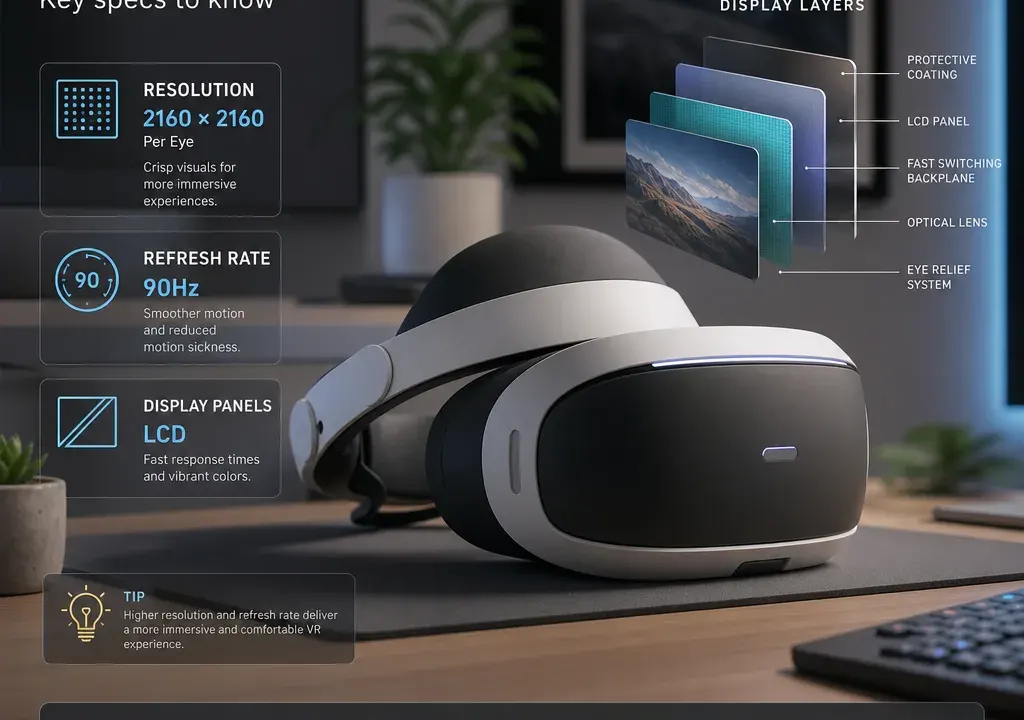
Choosing a VR headset is not just about picking the biggest number on a product page. Display resolution, refresh rate and panel type all affect the experience, but they matter in different ways depending on whether you want immersive gaming, seated media, fitness apps, development work or a simple phone-based viewer.
In VR Virtual Reality, it is also easy to compare unlike-for-like products. A standalone headset, a phone viewer, a base station, a head strap and a charging dock can all appear in the same broader shopping area, yet they solve very different problems. Before judging value, make sure you are comparing actual VR Headsets with other headsets, and keeping VR Accessories in a separate part of your budget.
The first buying decision is simple: are you buying the headset itself, or something that supports a headset you already own? In the supplied catalogue context, products such as the Stealth Charge Station for Meta Quest 3S, KIWI Design K4 Comfort Head Strap for Meta Quest 3, HTC VIVE Steam VR Base Station 2.0 and HTC VIVE Ultimate Tracker 3+1 Kit are best treated as accessories or tracking add-ons rather than direct headset alternatives.
That matters because an accessory can look like a strong deal in price terms, but it will not improve resolution or refresh rate unless it is part of a wider system that already supports those capabilities. A carry case, strap, controller part or charging station may improve convenience, comfort or maintenance, but it should not be compared against a headset on display performance.
For headset comparison, focus on products that actually provide the viewing experience. In the current candidate set, the Lenovo ThinkReality VRX is a more relevant headset-style product to compare on core technical specifications, while phone-based viewers such as Google Cardboard-style glasses or a VR phone headset depend heavily on the phone used with them.
Resolution describes how many pixels the display can show. In VR, the useful comparison is usually the resolution per eye or the total resolution split across both eyes. A higher listed resolution can make virtual scenes look sharper, text easier to read and fine detail less blocky, but it is not the only factor behind image quality.
When comparing VR Headsets, check whether the listing clearly states per-eye resolution, total resolution or just a marketing phrase such as HD or 4K-style wording. Per-eye figures are usually more helpful because each eye sees its own image. If two listings use different formats, do not assume the larger-looking number is automatically better.
Resolution is especially important if you plan to read text in VR, use productivity-style apps, watch detailed media, explore simulation content or play games where distant detail matters. For very casual use, short sessions or simple phone-based viewing, ultra-high resolution may be less important than comfort, compatibility and ease of setup.
Phone VR viewers are a special case. Products such as basic cardboard-style virtual reality glasses or phone headset shells do not usually have their own display panel in the same way as a standalone headset. The phone screen provides the resolution, so the viewer’s lenses, phone fit and your handset’s display are the real comparison points.
Refresh rate is usually shown in hertz, such as 72Hz, 90Hz or 120Hz when listed. It describes how many times per second the display can update. In simple terms, a higher refresh rate can make movement look smoother, provided the headset and the content can actually run at that rate.
For fast games, fitness apps and experiences with quick head movement, refresh rate can feel more important than a small increase in resolution. Smooth motion can make interactive content feel more natural. For slower seated media, virtual tours or occasional viewing, refresh rate may be less critical than display clarity, comfort and price.
Do not judge refresh rate in isolation. A headset with a high listed refresh rate still needs suitable hardware performance and supported software modes. If a listing only gives a maximum refresh rate, look for wording that explains when that rate is available. If the product page does not state the refresh rate at all, treat that as a comparison gap rather than assuming it matches better-specified alternatives.
Panel type tells you what kind of display technology is used. Common terms include LCD and OLED, although not every listing will state this clearly. As a broad buying principle, panel type can influence contrast, black levels, brightness, colour presentation, response and cost, but the exact result depends on the full headset design rather than the panel label alone.
OLED panels are often associated with stronger contrast and deeper-looking blacks, while LCD panels are common in many modern headsets and can offer a sharp, practical experience depending on resolution and lens design. The important point is not to buy solely on panel name. Compare it alongside resolution, refresh rate, optics, comfort and the type of content you expect to use.
If panel type is missing from a listing, it does not automatically make the product poor, but it does make precise comparison harder. For shoppers who care about films, dark game environments or visual richness, panel information may be worth seeking out before buying. For a budget phone viewer, panel type may simply be the phone’s own screen technology rather than a headset specification.
Price in VR Virtual Reality can vary widely because the category includes full headsets, phone viewers, tracking hardware, replacement parts and comfort accessories. A low-cost viewer and a dedicated standalone headset are not competing on the same terms, even if both appear under virtual reality shopping results.
A better value comparison starts with the job you need the product to do. If you want a complete VR experience, prioritise headset specifications, controller support, platform compatibility and what else is required to get started. If you already own a headset, then offers on VR Accessories such as straps, charging docks, carry cases or tracking add-ons may be the more useful place to compare savings.
Catalogue discounts can be helpful signals, but they should not override suitability. For example, a heavily reduced accessory is still only good value if it fits your specific headset and solves a real problem. Likewise, a lower-cost phone viewer can be sensible for occasional curiosity, but it should not be judged against a dedicated headset on resolution, refresh rate or tracking performance.
For immersive gaming, look for a balanced spec sheet: clear listed resolution, a refresh rate suited to fast movement, controller compatibility and enough information about tracking. A headset that is sharp but limited in motion performance may not feel as convincing in action-heavy games.
For fitness and active apps, refresh rate, comfort, strap design and cable-free convenience may matter more than chasing the highest resolution. Check the headset weight, fit options and whether accessories such as replacement straps or charging docks could make regular use easier.
For watching media, resolution and lens clarity usually sit higher on the priority list. Panel type may also be worth comparing if you care about contrast in films or darker scenes. Refresh rate still matters, but you may not need the highest listed rate for mostly seated viewing.
For work, training or development, pay close attention to text clarity, comfort over longer sessions and ecosystem support. A product such as the Lenovo ThinkReality VRX may appear in a very different part of the market from a simple phone viewer, so compare the intended use first and the headline price second.
For casual curiosity or gifting, a phone-based viewer can be an inexpensive entry point if the recipient has a suitable phone, but be realistic about the experience. The phone’s display, sensors and app support will shape the result more than headset resolution claims.
First, confirm the product type. Is it a complete headset, a phone viewer, a tracking component, a strap, a case, a charger or a replacement part? This avoids comparing a VR Accessory with a VR Headset by mistake.
Second, look for resolution information in a comparable format. Per-eye resolution is particularly useful. If only broad marketing wording is shown, compare more cautiously.
Third, check the listed refresh rate and whether it is a typical rate or a maximum supported mode. Higher can be better for motion, but only when the headset and content support it properly.
Fourth, note the panel type if supplied. Use it as one part of the decision, not the whole decision.
Fifth, compare the total cost of ownership. A headset may need controllers, tracking hardware, a compatible phone, a capable PC or useful accessories. An offer that looks cheaper at first can become less attractive if key extras are required.
Higher resolution can improve sharpness and text clarity, but it is not automatically the best choice. Refresh rate, lenses, comfort, tracking, content support and price all affect the experience. Match the resolution to your main use case rather than choosing by the biggest number alone.
For fast games and active use, a higher listed refresh rate is generally worth considering because it can support smoother motion. For casual media or occasional viewing, resolution, comfort and compatibility may matter just as much. Always check whether the refresh rate is clearly stated and supported for the content you want.
Most phone-based VR viewers rely on the phone screen, so the phone largely determines the display resolution and panel type. The viewer itself mainly affects fit, lenses, comfort and how securely it holds the handset.
Only if they solve a clear need. A better strap, carry case, charging dock or tracking accessory can be useful, but check compatibility carefully and keep accessory spending separate from the headset’s core display specifications.
Treat missing specs as a reason to compare carefully. It may still be a suitable product, especially for simple accessories or phone viewers, but for a full headset you should ideally have clear information on resolution, refresh rate and compatibility before deciding.
The best VR headset choice is not simply the one with the highest resolution, the fastest refresh rate or the biggest discount. It is the one whose specifications match how you plan to use VR, with a price that makes sense once any required accessories are included.
When comparing VR Virtual Reality products, separate complete VR Headsets from VR Accessories first, then judge resolution, refresh rate and panel type in context. That approach makes it much easier to spot genuine value and avoid paying for specs you will not really use.
