
Loading buyer guide
Hurry, don't miss savings on selected furniture & more.* Shop all offers
New and refurbished laptops can both be good buys, but the better choice depends on specification, condition notes, warranty cover, retailer stock and how long you expect to keep the device.
Use our barcode scanner to match products instantly to find the best prices, find products with ease using our voice search and build wish lists and your favourites at the click of a button.
Best student laptops for university
University laptops need to do more than look slim in a lecture hall. The best choice depends on your course software, how often you carry it, how many browser tabs you keep open and whether a retailer offer is genuinely useful once you check the specification.
256GB vs 512GB vs 1TB laptop storage: which should you choose?
Laptop storage is one of the easiest specs to underestimate. A lower-capacity model can look better value at first glance, while a larger SSD may save you from juggling files, photos and apps later. The right choice depends on how you actually use your laptop, not just the biggest number on the listing.
Best lightweight laptops for travel and commuting
Portable laptop shopping is less about chasing the smallest machine and more about balancing screen size, battery expectations, ports, price and where the offer is available. Here is how to compare travel-friendly options without overpaying for features you will not use.
HP vs Dell laptops: which is right for work and study?
HP and Dell both cover everyday study, office work and more capable productivity machines, but the better buy depends on the specification in front of you rather than the badge alone. Compare processor, memory, storage, screen size, weight and live availability before deciding.
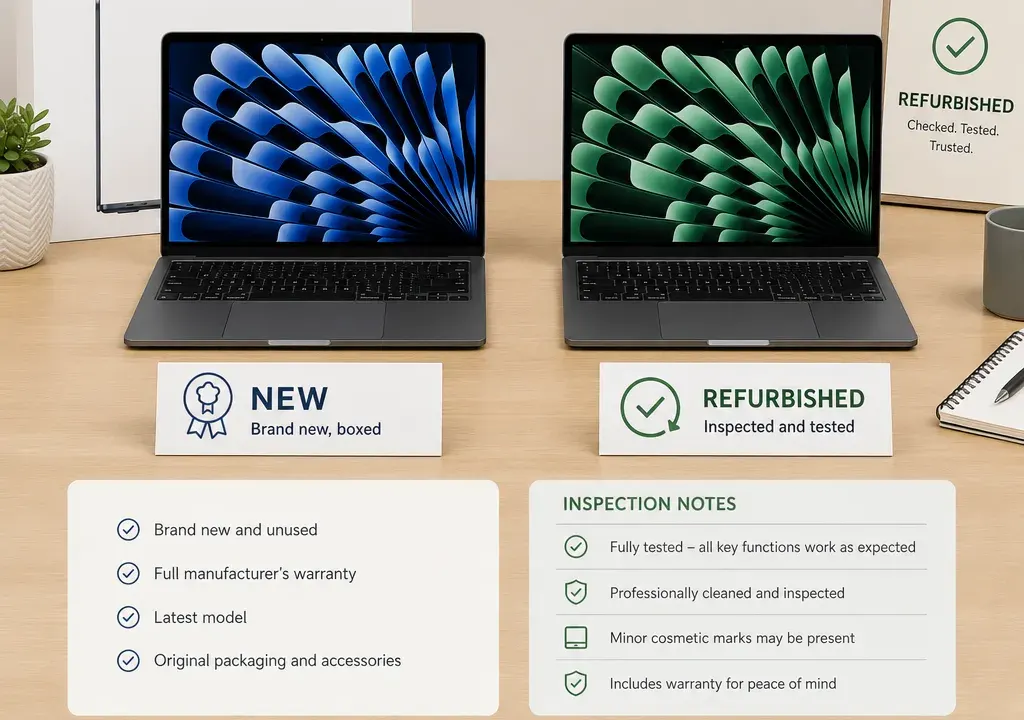
Choosing between a new and a refurbished laptop is rarely as simple as picking the cheapest listing. The right answer depends on what you need the laptop to do, how transparent the listing is, and whether the saving is large enough to justify any compromises on condition, packaging or warranty support.
In Laptops, shoppers are often comparing very different machines in the same browsing session: compact Chromebooks, everyday Windows laptops, convertible models, premium ultraportables and performance-focused machines. That makes a like-for-like comparison essential. A refurbished higher-spec laptop may beat a basic new model for speed or storage, but a new laptop may be easier to assess if you want a straightforward purchase with fewer unknowns.
Before comparing new and refurbished listings, define the use case. For basic browsing, email, video calls and schoolwork, an entry-level Chromebook or simple everyday laptop can make sense. Catalogue examples in this area include models such as the Acer Chromebook 311, Samsung Galaxy Go 14 Chromebook and HP Chromebook Plus 14. The key checks are screen size, memory, storage type, operating system and whether your preferred apps will run comfortably.
For study, office work, multitasking and general family use, look at mainstream Windows laptops and lightweight productivity models. Listings such as the Acer Aspire Go 15 and Samsung Galaxy Book4 sit in this broader everyday category, where processor generation, RAM, storage and screen size can affect long-term usefulness.
For creative work, demanding multitasking or gaming-adjacent use, compare higher-spec machines more closely. Products such as the MSI Pulse 16 AI, Samsung Galaxy Book4 Edge, Galaxy Book4 Pro 360 and premium ASUS models may appear with stronger processors, larger screens or more advanced feature sets. In this part of the market, a refurbished listing can look tempting if it brings a higher specification into budget, but it needs clearer condition and warranty information to be worth the risk.
A new laptop is often the better option when you want maximum clarity. You should normally expect a new item to have untouched condition, standard packaging where supplied by the retailer, and straightforward retailer information about returns, warranty and availability. That matters if the laptop is for work, a student deadline, a gift or anyone who does not want to interpret condition grades.
New can also be better value when discounts narrow the gap. If a current new listing is heavily reduced, the usual refurbished saving may no longer be large enough to justify potential compromises. Some laptop listings show very large reductions in catalogue data, so it is worth checking the live retailer page carefully for the final price, exact model code, stock status and whether the specification matches the headline.
A new laptop may also be preferable for battery confidence. Battery life varies by model, usage and age, and refurbished listings do not always give the same level of detail. If unplugged working time is a priority, a new laptop with clear manufacturer specification and retailer support may be easier to compare.
A refurbished laptop can be the stronger buy when it offers a noticeably better specification than a similarly priced new model. That might mean more RAM, larger storage, a sharper screen, a better processor or a more premium build. The value case is strongest when the retailer clearly explains the condition, what refurbishment means, what accessories are included and what warranty or guarantee applies.
Refurbished can be especially appealing for higher-end laptops. If you are comparing a basic new laptop against a refurbished premium or performance model, the refurbished option may feel faster or more capable for demanding workloads. However, the listing must give enough detail for you to judge the trade-off. Vague descriptions such as “good condition” are less useful than clear notes on cosmetic marks, battery status, keyboard layout, charger inclusion and any replaced parts.
Availability matters too. Refurbished stock can be limited, and two listings with the same model name may not be equivalent. One may have more RAM, a different processor, a smaller drive or a different screen. Always compare the full specification, not just the product family name.
Use a simple like-for-like checklist. First, compare the processor, memory and storage. For everyday use, RAM and storage can make a bigger difference than small design features. For heavier work, the processor family and graphics capability become more important. Do not assume that a higher original price or larger discount automatically means better value.
Second, compare the condition information. A new listing should be clear by definition, while refurbished listings should explain whether the item is pristine, very good, good or acceptable, if those grades are used. The best listing is the one that removes uncertainty. If the condition wording is thin, treat the saving with caution.
Third, compare warranty details. Look for who provides the cover, how long it lasts, what is excluded and how faults are handled. Do not assume every refurbished laptop has the same support as a new one. Equally, do not dismiss refurbished if the retailer gives clear, useful support information.
Fourth, check stock availability and delivery options on the retailer page before making a decision. A good price is only useful if the model is actually available in the specification shown. Stock can also affect colour, keyboard layout, storage size and bundled accessories.
Laptop catalogues sometimes show dramatic reductions, particularly when original prices, marketplace data or promotional signals are being compared. A very high discount can be a useful prompt to investigate, but it should not be the reason you buy on its own.
If a listing appears far cheaper than similar laptops, pause and verify the basics: exact model number, processor, RAM, storage, screen size, operating system, condition, included charger, warranty details and retailer stock. Also check whether the product title and specification panel agree. If anything looks inconsistent, compare nearby offers in Laptops before committing.
This is particularly important across premium models, gaming-style laptops and Copilot-branded PCs, where small differences in configuration can create large differences in value. Two laptops with similar names can perform very differently.
Choose new if you want the simplest buying experience, predictable condition and clear post-purchase support. It is also the more comfortable route for gifts, urgent work needs and buyers who do not want to analyse condition grades.
Choose refurbished if you are specification-led and willing to read the listing closely. It can be a smart route when a better processor, more memory or a more premium design matters more than having a factory-fresh item. The saving should be meaningful enough to offset any uncertainty around wear, packaging and battery history.
For students and home users, compare a new Chromebook or everyday Windows laptop against a refurbished mid-range model. For professionals, check whether the refurbished machine gives you enough support and reliability for daily work. For gamers and creators, pay special attention to graphics, cooling design, screen quality, RAM and storage, because the word “laptop” covers a very wide performance range.
Ask three questions. What am I gaining by choosing refurbished instead of new? What am I giving up in condition, warranty clarity or battery confidence? Would I still choose this laptop if the discount badge disappeared?
If the refurbished option clearly gives you a stronger specification, transparent condition notes and acceptable warranty information, it may be the better-value buy. If the new option is only slightly more expensive and removes several uncertainties, new may be the smarter long-term choice.
The best purchase is the one that fits your actual workload, not the one with the biggest claimed reduction. Compare products and offers across Laptops with the full specification open, and treat price as one part of the decision rather than the whole decision.
They can be, especially when the specification is significantly better than a similarly priced new laptop. The listing should clearly explain condition, included accessories, warranty details and stock availability. If that information is vague, the saving may not be worth the uncertainty.
No. A new laptop is usually easier to assess and may offer clearer support, but a refurbished laptop can offer stronger performance for the money. The better choice depends on the exact model, specification, condition information and retailer terms.
Check the processor, RAM, storage, screen size, operating system, condition grade, cosmetic notes, battery information where provided, charger inclusion, warranty details and whether the item is actually in stock in that configuration.
Treat it as a reason to investigate rather than a reason to buy immediately. Verify the live price, exact model code, specification, condition and retailer availability. Very large discounts can sometimes reflect differences in configuration or catalogue data rather than a straightforward saving.
It can be, but compare the detailed specification carefully. Processor, graphics capability, RAM, storage and screen quality matter more for gaming and creative tasks than the general model name. Warranty clarity is also important if the laptop will be used heavily.
Refurbished vs new laptops is a value question, not a simple quality question. New is usually the clearer, lower-effort choice. Refurbished can be the sharper buy when it gives you a better specification, transparent condition notes and support terms you are comfortable with.
Before buying, compare the full specification, warranty details, condition information and stock status across available offers. The best-value laptop is the one that meets your needs reliably at a price that makes sense today, not simply the one with the biggest discount label.
