
Loading buyer guide
Hurry, don't miss savings on selected furniture & more.* Shop all offers
Commuters need a laptop that fits a bag, works comfortably on a train or café table, and does not force too many compromises. We rank current catalogue options by portability signals, value and availability, with clear checks to make before buying.
Use our barcode scanner to match products instantly to find the best prices, find products with ease using our voice search and build wish lists and your favourites at the click of a button.
Best student laptops for university
University laptops need to do more than look slim in a lecture hall. The best choice depends on your course software, how often you carry it, how many browser tabs you keep open and whether a retailer offer is genuinely useful once you check the specification.
256GB vs 512GB vs 1TB laptop storage: which should you choose?
Laptop storage is one of the easiest specs to underestimate. A lower-capacity model can look better value at first glance, while a larger SSD may save you from juggling files, photos and apps later. The right choice depends on how you actually use your laptop, not just the biggest number on the listing.
HP vs Dell laptops: which is right for work and study?
HP and Dell both cover everyday study, office work and more capable productivity machines, but the better buy depends on the specification in front of you rather than the badge alone. Compare processor, memory, storage, screen size, weight and live availability before deciding.
ASUS vs Lenovo laptops: which brand offers better value?
ASUS and Lenovo both cover everyday, creative, student and premium laptop needs, but value depends less on the badge and more on the specification, model family and offer quality in front of you.
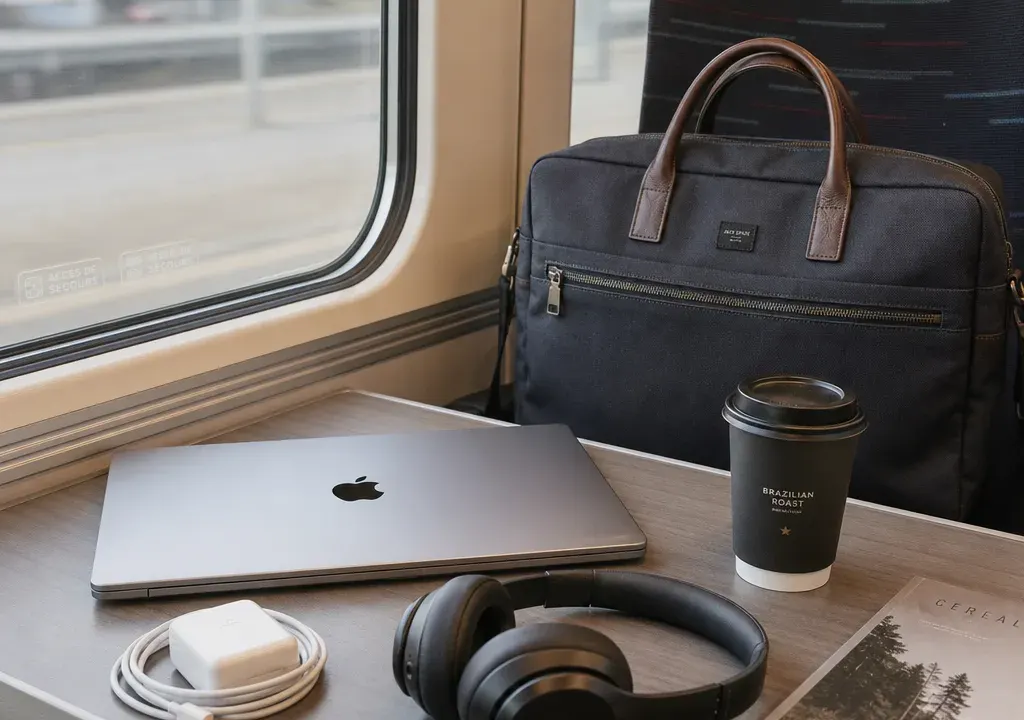
Choosing a travel laptop is a different decision from choosing a desk laptop. A big screen may be comfortable at home, but on a train table or in a packed café it can quickly feel awkward. At the same time, the lightest-looking option is not always the most practical if it lacks the ports, storage or battery life you need for a full working day.
For this Laptops guide, the focus is portability for UK travel and commuting. The ranking uses the available catalogue information from the supplied product candidates: screen size where stated, thickness and weight where available, battery-related clues where listed, connectivity information where listed, price/value signals and retailer availability. Where important details such as exact weight, thickness, battery capacity or port selection are not present in the catalogue data, you should check the retailer product page before committing.
Start with screen size. For most commuters, a 13-inch or 14-inch laptop is the easiest size to carry and use in tight spaces. A 15-inch model can still be manageable if the chassis is slim, while 16-inch and 18-inch laptops are better for people who prioritise workspace over minimum bag weight.
Next, check the actual weight and thickness, not just the screen size. Two laptops with the same screen size can feel very different in a rucksack. If the listing does not show weight or dimensions, treat portability as unconfirmed rather than assuming it is light.
Battery life is another key commuting factor, but catalogue titles often do not give enough detail. Look for stated battery life, charger type and fast-charging information on the retailer page. If you move between offices, trains and cafés, USB-C charging can be especially useful, but only count it if the specification clearly confirms it.
Connectivity matters more than many buyers expect. A travel laptop with only a small number of ports may still be fine if you use wireless accessories and cloud storage, but you may need HDMI, USB-A, USB-C, a microSD slot or a headphone connection depending on how you work. Always compare the ports before choosing the cheapest offer.
1. HP Chromebook Plus 14 14A-Nf0000Na: The most straightforward travel pick in this shortlist if your work is mainly browser-based. The 14-inch screen size is a good commuter-friendly starting point, and Argos availability gives it a clear named retailer in the supplied data. As with any Chromebook, check that the apps and storage model suit your workflow before choosing it over a Windows laptop.
2. Samsung Galaxy Go 14 Chromebook Intel N4500 8GB Ram 64GB Black: Another compact Chromebook option, with 8GB RAM and 64GB storage shown in the product title. It is best considered for web work, email, streaming and light admin rather than demanding creative or gaming tasks. The OnBuy listing has a strong value signal in the supplied catalogue, but confirm the final selling price, condition and specification before buying.
3. Acer Chromebook 311 CBOA311-1H-C7L1: This looks like a budget-friendly Chromebook candidate and may appeal to students or casual commuters who want a simple machine. The supplied title does not clearly state screen size, weight, thickness, battery life or ports, so it should not be treated as the portability winner until those details are checked. Its Currys availability is useful for shoppers who prefer a well-known UK electronics retailer.
4. Samsung Galaxy Book4 NP750XGK-KG3UK: A better choice if you want a more conventional laptop experience than a Chromebook can offer. The catalogue data does not provide travel-critical measurements, so the main reason it sits in the middle of this ranking is the balance between Samsung’s Galaxy Book positioning, the price/value signal and Argos availability. Confirm screen size, weight and battery claims before choosing it for daily carrying.
5. Samsung Galaxy Book4 Edge 16-Inch Laptop: The 16-inch screen is the trade-off here. It may be attractive if you want more room for spreadsheets, split-screen work or streaming while travelling, but it will not feel as compact as a 14-inch option. Consider it if you commute with a larger bag and care more about workspace than minimum footprint.
6. Samsung Galaxy Book4 Pro 360 Laptop: A 360-degree design can be useful for presentations, note-taking or media use, but the supplied data does not give the screen size, weight or thickness. Convertible laptops can be excellent travel companions when they are slim enough, so this is a specification-check pick rather than an automatic recommendation. Look closely at weight, hinge design, stylus support if relevant, ports and battery details.
7. ASUS Zenbook S16 UM5606 Copilot PC: A Zenbook S model may sound like a portability-focused choice, but the supplied catalogue price signal is unusually low compared with the original price shown, so it needs extra verification before being treated as a serious bargain. The S16 naming suggests a larger-screen class, which may be less convenient than a 14-inch laptop for cramped commuting. Check the retailer listing carefully for final price, specification, stock status and dimensions.
8. Samsung Galaxy Book6 Pro 16 Inch Core Ultra 7 1TB Grey: This is a premium-looking productivity option from the supplied title, with a 16-inch screen and 1TB storage stated. For travel, however, the larger screen and higher price band make it a better fit for users who want strong capability in one machine rather than the smallest possible carry. It is worth comparing if you need more storage and a larger display for work away from home.
9. Acer Aspire Go 15 Laptop Intel Core i7: The 15-inch class sits between compact commuter laptops and larger desktop-replacement models. The Intel Core i7 mention suggests the listing is aimed at buyers who want stronger performance than an entry-level Chromebook, but portability cannot be confirmed without weight, thickness and battery details. Shortlist it if you want a general-purpose Windows laptop and do not mind carrying something larger than 14 inches.
10. MSI Pulse 16 AI C1V Core Ultra 7 and MSI Pulse 16 AI C1V 9S7-15P311-008: These MSI Pulse 16 options are likely to appeal to performance-focused buyers, but the 16-inch format is less ideal for a lightweight commuting brief. They may make sense if you travel between fixed work locations and need a larger screen or more power, but for train-table use and all-day carrying, compare weight, charger size, battery expectations and fan noise information before deciding.
11. ASUS Vivobook 18 M1807GA-S8012W Ryzen 5 430 Laptop: An 18-inch laptop is difficult to recommend as a lightweight travel choice. It may be useful if you want a large display at home or in a hotel room, but it is the least commuter-friendly option in this shortlist based on the screen-size signal alone. Only choose this kind of model for travel if your priority is screen space and you have checked that your bag, desk space and charger needs are realistic.
For train and tube commuters, start with the 14-inch Chromebooks and compact models. They are easier to open in restricted spaces and less likely to feel awkward on a narrow table. The HP Chromebook Plus 14 and Samsung Galaxy Go 14 Chromebook are the most obvious candidates from the supplied list because their titles clearly point to 14-inch screens.
For hybrid workers who carry a laptop two or three days a week, a 15-inch or slim 16-inch laptop can be a good compromise if the weight and battery life are strong. The Samsung Galaxy Book4, Galaxy Book4 Edge 16-inch and Acer Aspire Go 15 are worth comparing here, but only after confirming the exact dimensions and ports.
For buyers who want one laptop for travel, home working and heavier tasks, the larger Samsung Galaxy Book Pro, MSI Pulse 16 and ASUS Zenbook S16 candidates deserve a closer look. The trade-off is simple: more screen and potential performance usually means more bulk, a larger charger or shorter unplugged use under heavy workloads. Do not buy a performance-led laptop for commuting until you have checked the charger size as well as the laptop itself.
Catalogue discounts can be useful signals, but do not rely on the percentage alone. Some supplied listings show very large reductions, and one or two headline prices appear unusually low compared with the stated original price. Treat those as prompts to verify the live retailer listing, final checkout price, product condition and exact model number rather than as guaranteed bargains.
Compare the total value of the offer, not just the sticker price. A slightly more expensive laptop may be the better buy if it has the right RAM, storage, screen size, battery information and connectivity for your commute. Conversely, a cheap laptop that needs adapters, cloud storage upgrades or an early replacement may not be the best value.
Retailer availability also matters. The shortlist includes products from retailers such as Argos, Currys, Amazon, OnBuy, EE Mobile, Very and Gaming Kit in the supplied data. Availability can change, so use the retailer shown as a current comparison point rather than a permanent guarantee of stock.
Before buying, confirm the exact weight, thickness and charger weight. Many shoppers compare the laptop body and forget that a bulky power brick can make a real difference in a daily bag.
Check the battery claim and how it is measured. A laptop that lasts well for browsing may drain faster during video calls, creative apps or gaming. If the retailer page gives different battery figures for different use cases, use the one closest to your real routine.
Look at ports and wireless connectivity. If you regularly connect to meeting-room screens, external monitors, wired accessories or SD cards, make sure the laptop supports that without too many adapters.
Confirm RAM and storage. For light commuting tasks, 8GB RAM can be workable, especially on a Chromebook, but heavier multitasking benefits from more memory. Storage needs depend on whether you work in the cloud or keep large files locally.
Finally, think about comfort. A laptop can be technically portable but still frustrating if the keyboard feels cramped, the screen is too reflective or the webcam and microphones are not good enough for your meetings. These details are worth checking in product images and specifications before you compare final offers.
For many commuters, yes. A 14-inch laptop usually offers a good balance between usable screen space and easy carrying. It is typically more practical on trains and in cafés than a 16-inch or 18-inch model, but you should still check the exact weight and dimensions.
A Chromebook can be a strong travel choice if most of your work happens in a browser and you are comfortable using cloud storage and web apps. If you need specific Windows software, specialist creative tools or more local storage, compare Windows laptops instead.
Not always, but they are a compromise. A 16-inch laptop gives more workspace, which helps with spreadsheets and multitasking, but it takes up more bag space and can be awkward on small tables. Check weight, thickness and charger size before buying one for daily travel.
Very important, especially if you work away from plug sockets. Do not rely only on marketing wording in a title. Check the retailer specification for stated battery life, charging type and any fast-charging information, then judge it against your actual workload.
Use them as a reason to investigate, not as proof of value. Compare the current selling price, specification, retailer availability, condition and model number. Very large reductions can be genuine, but they can also reflect older models, marketplace listings or data that needs checking.
The best lightweight laptop for travel is the one that matches your journey, not simply the one with the biggest discount. From the supplied options, 14-inch Chromebook candidates look strongest for straightforward commuting, while 15-inch and 16-inch laptops suit buyers who need more performance or screen space and are willing to carry more.
When comparing Laptops, keep the decision grounded in practical details: screen size, actual weight, thickness, charger size, battery information, ports, storage, price and retailer availability. Shortlist by portability first, then compare offers so you do not pay extra for power or size you will rarely use on the move.
