
Loading buyer guide
Hurry, don't miss savings on selected furniture & more.* Shop all offers
Before choosing between 8GB, 16GB and higher memory, compare RAM with the processor, storage, graphics and the type of laptop you actually need.
Use our barcode scanner to match products instantly to find the best prices, find products with ease using our voice search and build wish lists and your favourites at the click of a button.
Best student laptops for university
University laptops need to do more than look slim in a lecture hall. The best choice depends on your course software, how often you carry it, how many browser tabs you keep open and whether a retailer offer is genuinely useful once you check the specification.
256GB vs 512GB vs 1TB laptop storage: which should you choose?
Laptop storage is one of the easiest specs to underestimate. A lower-capacity model can look better value at first glance, while a larger SSD may save you from juggling files, photos and apps later. The right choice depends on how you actually use your laptop, not just the biggest number on the listing.
Best lightweight laptops for travel and commuting
Portable laptop shopping is less about chasing the smallest machine and more about balancing screen size, battery expectations, ports, price and where the offer is available. Here is how to compare travel-friendly options without overpaying for features you will not use.
HP vs Dell laptops: which is right for work and study?
HP and Dell both cover everyday study, office work and more capable productivity machines, but the better buy depends on the specification in front of you rather than the badge alone. Compare processor, memory, storage, screen size, weight and live availability before deciding.
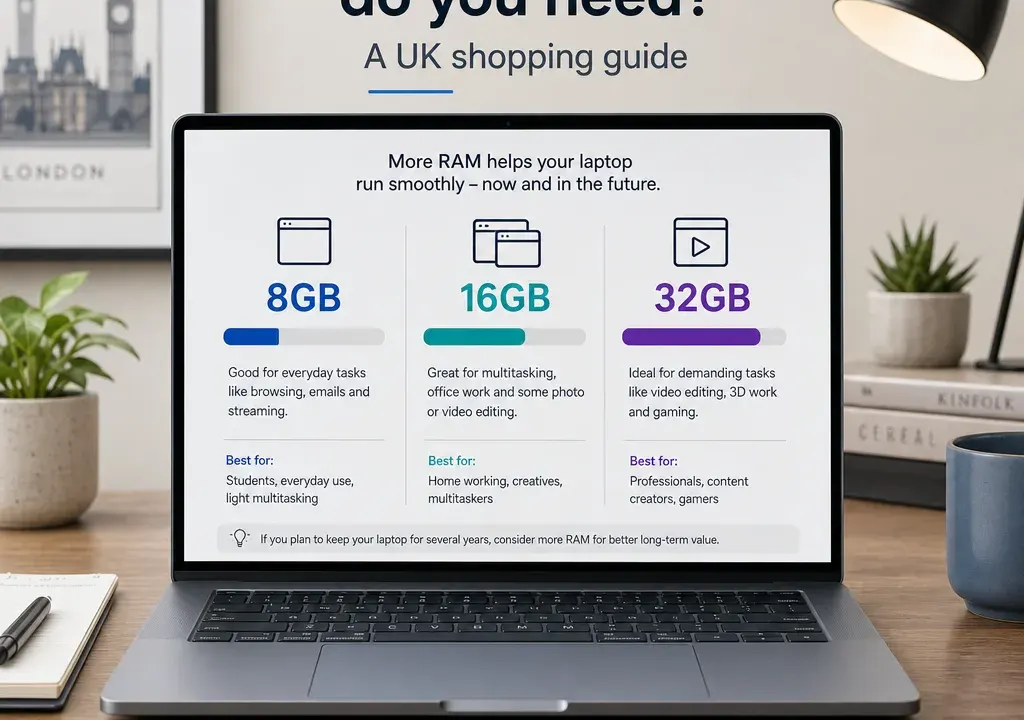
RAM affects how many apps, browser tabs and background tasks your laptop can keep active at once. It is not the only performance spec that matters, but it can make the difference between a laptop that feels comfortable and one that starts to struggle when your workload grows.
When comparing Laptops, treat RAM as part of a wider decision rather than a single headline number. An 8GB Chromebook, a 16GB Windows laptop and a 32GB creator or gaming model are designed for different shoppers. The best choice is the one that matches your daily use, your budget and the rest of the specification.
RAM is short-term working memory. It helps your laptop keep things ready while you switch between them, such as a browser, video call, document, spreadsheet, streaming app or photo editor.
More RAM does not automatically make every laptop faster. If the processor is weak, storage is slow, or the laptop has limited cooling, simply choosing more memory will not fix everything. Equally, a very capable processor paired with too little RAM can feel held back once you start multitasking.
That is why comparison is important. Use RAM filters to narrow your shortlist, then compare processor family, storage capacity, screen size, battery claims, weight, operating system and retailer offers before deciding.
For many shoppers, 8GB is the entry point to consider for a general laptop. It can suit web browsing, email, streaming, schoolwork, cloud documents and light office tasks, especially if you do not keep dozens of browser tabs open at the same time.
8GB can be particularly workable on Chromebooks and other lighter-use devices, because the operating system and typical apps are often less demanding than heavier desktop workloads. In the current laptop catalogue, for example, the Samsung Galaxy Go 14 Chromebook listing clearly specifies 8GB RAM alongside 64GB storage, which gives shoppers a useful reference point for comparing budget-friendly Chromebook-style options.
The trade-off is headroom. If you regularly use large spreadsheets, lots of tabs, video calls and multiple apps together, 8GB may begin to feel limiting sooner than 16GB. It is often best for shoppers prioritising affordability and simple daily tasks over long-term performance flexibility.
For a Windows laptop used for work, study or family multitasking, 16GB is often the more comfortable choice. It gives more breathing room for browser-heavy work, Microsoft Office-style tasks, video calls, photo management and switching between several apps.
This is the amount many buyers should compare first if they want a laptop to feel less restrictive over time. It is also a sensible starting point for students on demanding courses, hybrid workers, and anyone who keeps plenty of tabs and files open throughout the day.
When browsing Laptops, use a 16GB RAM filter and then compare the models by processor tier. A 16GB laptop with a modern mid-range or better processor may be a more balanced buy than a cheaper-looking model where the processor, storage or screen quality does not suit your needs.
Higher-memory laptops are aimed at heavier use: serious creative work, large project files, advanced multitasking, software development, virtual machines, data-heavy workloads and some gaming or creator setups. If your apps recommend more memory, or you already know that your current laptop runs out of RAM, 32GB or more can be worth comparing.
For everyday browsing and streaming, higher RAM is usually less important than spending well across the whole laptop. A better screen, larger storage, lighter design or stronger processor may matter more if your workload is not memory-heavy.
Catalogue examples such as MSI Pulse models, Samsung Galaxy Book Pro lines and ASUS Zenbook-style laptops can appear in more performance-focused parts of the market, but you should still check the actual listed RAM, processor, graphics and storage on the individual offer before assuming it fits a demanding workload.
RAM is only one part of laptop performance. A good comparison should include at least four other specs.
First, compare the processor. A laptop with more RAM but an older or lower-power processor may not feel as responsive as a more balanced alternative. Look at the processor family and generation where available, and match it to your workload rather than choosing by brand name alone.
Second, compare storage. RAM helps with active tasks, while storage holds your files and apps. A laptop with limited storage may feel cramped even if it has enough memory, especially if you keep photos, videos or large documents locally.
Third, consider graphics. If you game, edit video or use 3D software, graphics capability matters. Some laptops use integrated graphics, which may share system memory, making RAM capacity more relevant.
Fourth, look at screen size and portability. A 16-inch laptop may be better for multitasking on a desk, while a 14-inch model may suit commuting or lectures. The right RAM choice should support how and where you use the device.
Start by filtering Laptops by RAM: 8GB, 16GB, then 32GB and above if needed. This prevents you from comparing completely different types of machine at the same time.
Next, apply your intended use. For basic browsing and streaming, include Chromebooks and lower-cost everyday laptops. For office work and study, compare 16GB Windows laptops alongside processor and storage. For gaming, creative work or advanced multitasking, move into higher RAM options and check graphics details carefully.
Then sort or compare by price and offer signals, but do not stop there. A large displayed saving can be useful to investigate, yet the better buy is the model whose full specification, retailer availability and overall value fit your needs. If an offer looks unusually low, check the product title, specification and retailer information carefully before relying on it.
Finally, open a few comparable product pages rather than jumping at the first deal. For instance, an Acer Chromebook, HP Chromebook Plus, Samsung Galaxy Book, Acer Aspire, ASUS Vivobook, ASUS Zenbook or MSI Pulse may each suit a different type of buyer, even when the headline discount or price band looks tempting.
Choose 8GB if you want an affordable laptop for browsing, streaming, email, school portals, online shopping and light documents. It is most convincing when paired with a lightweight operating system or when your expectations are modest.
Choose 16GB if you want a main laptop for work, study, family use or everyday multitasking. It is the most balanced comparison point for many shoppers because it gives more room for tabs, apps and future software demands.
Choose 32GB or more if you already know your workload is heavy. That may include large creative projects, advanced coding, virtual machines, heavier gaming setups or professional applications. If you are unsure whether you need it, compare what else you could gain for the same budget, such as storage, screen quality or a stronger processor.
Check whether the RAM amount is clearly shown in the title or specification. Some product titles include memory and storage, while others focus on the model name, screen size or processor. Do not assume a whole product family has the same RAM across every version.
Look for upgradeability information if it is important to you, but do not assume RAM can be upgraded. Many slim laptops and some modern designs may have memory that is not intended to be replaced by the user. If the listing does not say, treat the supplied RAM as the amount you will live with.
Be careful not to confuse RAM with storage. A listing may mention 8GB RAM and 64GB storage, or 16GB RAM and 512GB storage. The first number is working memory; the second is file space. Both matter, but they solve different problems.
Also consider operating system. An 8GB Chromebook and an 8GB Windows laptop may not feel identical in use because the software environment and typical apps differ. Compare like with like where possible.
8GB can be enough for light everyday use, such as web browsing, streaming, email and basic documents. It is less ideal if you keep many tabs open, use demanding software or want extra headroom for several years.
If the laptop is your main work, study or family computer, 16GB is often the safer choice. It gives more room for multitasking and can make the laptop feel less restricted than an 8GB model.
32GB is mainly for demanding users, such as people working with large creative files, advanced development tools, virtual machines, heavy multitasking or some gaming and creator workloads. Many everyday buyers will not need it.
More RAM can help when your laptop is running out of memory, especially with lots of apps or tabs open. It will not automatically fix a weak processor, limited storage or other performance bottlenecks.
Neither spec should be judged alone. RAM affects multitasking, while the processor affects how quickly tasks are handled. A balanced laptop with enough RAM and a suitable processor is usually a better choice than one strong headline spec.
The easiest way to choose laptop RAM is to start with your real workload. 8GB is best treated as a light-use option, 16GB is the most comfortable middle ground for many buyers, and 32GB or more is for clearly demanding tasks.
When comparing Laptops, filter by RAM first, then compare processor, storage, graphics, screen size and retailer offers. That approach helps you avoid paying for memory you will not use, while also reducing the risk of buying a laptop that feels underpowered too soon.
