
Loading buyer guide
Hurry, don't miss savings on selected furniture & more.* Shop all offers
Choosing between a compact laptop, a mainstream 15-inch model and a larger desktop-replacement machine is really a trade-off between portability and productivity. Here’s how to compare the options sensibly.
Use our barcode scanner to match products instantly to find the best prices, find products with ease using our voice search and build wish lists and your favourites at the click of a button.
Best student laptops for university
University laptops need to do more than look slim in a lecture hall. The best choice depends on your course software, how often you carry it, how many browser tabs you keep open and whether a retailer offer is genuinely useful once you check the specification.
256GB vs 512GB vs 1TB laptop storage: which should you choose?
Laptop storage is one of the easiest specs to underestimate. A lower-capacity model can look better value at first glance, while a larger SSD may save you from juggling files, photos and apps later. The right choice depends on how you actually use your laptop, not just the biggest number on the listing.
Best lightweight laptops for travel and commuting
Portable laptop shopping is less about chasing the smallest machine and more about balancing screen size, battery expectations, ports, price and where the offer is available. Here is how to compare travel-friendly options without overpaying for features you will not use.
HP vs Dell laptops: which is right for work and study?
HP and Dell both cover everyday study, office work and more capable productivity machines, but the better buy depends on the specification in front of you rather than the badge alone. Compare processor, memory, storage, screen size, weight and live availability before deciding.
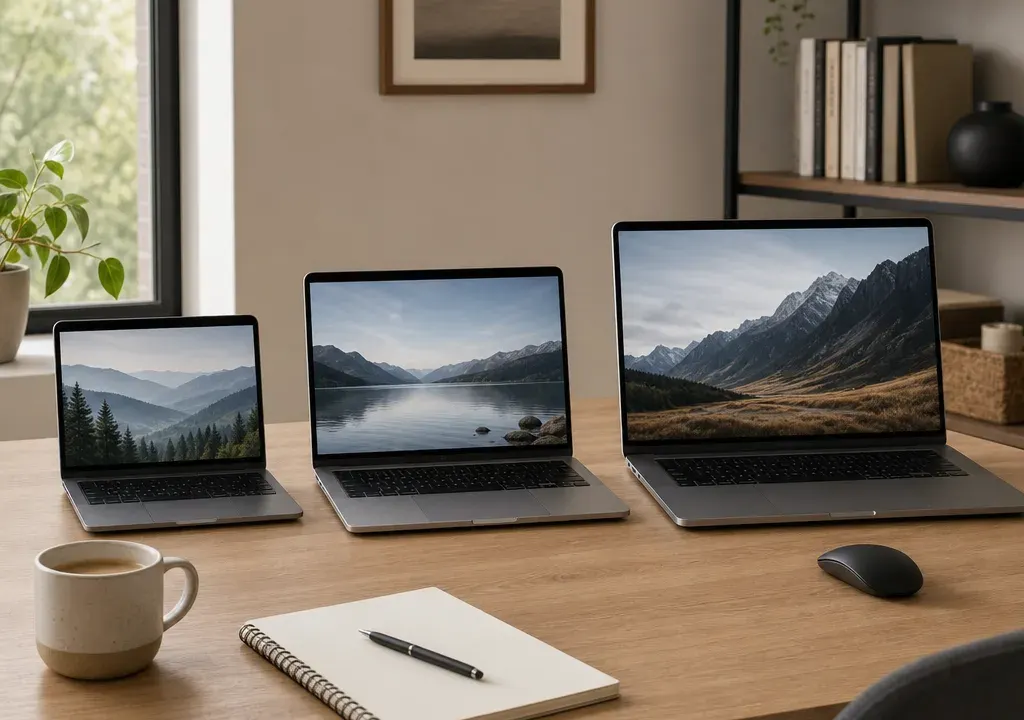
Choosing a laptop size is one of the most important decisions you will make, because it shapes how the machine feels every day. A powerful specification can still be frustrating if the laptop is too heavy to carry, while an ultra-portable model can feel limiting if you spend hours working across documents, spreadsheets and browser tabs.
For most shoppers, the real choice is not simply 13-inch versus 15-inch versus 17-inch. It is portability versus screen space, low weight versus cooling room, and a tempting offer versus the specification you will still be happy with in a few years. Current Laptops listings also show how varied the market is, with compact Chromebooks, mainstream 15-inch machines, 16-inch premium models and even larger 18-inch options all competing for attention.
A 13-inch laptop, or a similar compact model, is usually best if you travel often, work in cafés, commute with your bag every day or mostly use cloud-based tools. It gives up some screen space, but the smaller footprint is easier to live with outside the home.
A 15-inch laptop is the safest all-round choice for many people. It is usually large enough for comfortable home working, streaming, online shopping, admin and study, while still being portable enough to move between rooms or carry occasionally. Many mainstream offers sit in this size range, which can make comparison shopping easier.
A 17-inch laptop is best treated as a portable desktop rather than a truly mobile computer. It suits people who want a bigger view for creative work, spreadsheets, gaming, video calls or entertainment, but who do not want a separate desktop PC and monitor. If you only carry it from desk to sofa, the extra size can be worth it.
The appeal of a 13-inch laptop is simple: it is easier to carry, easier to use on a train table and less intrusive in a small bag. If your day involves email, web apps, writing, note-taking, video calls and light streaming, a smaller laptop can feel refreshingly convenient.
The compromise is screen room. Working with two windows side by side, editing large spreadsheets or spending long sessions in design tools can feel cramped. You can solve that at home with an external monitor, but if you need the laptop screen itself to do everything, a larger model may be more comfortable.
When comparing compact options in Laptops, look beyond the diagonal screen size. Check memory, storage, processor class and ports, because very portable machines can range from basic Chromebook-style models to premium productivity laptops. A low headline price is only good value if the specification matches how you actually work.
A 15-inch laptop is popular because it balances comfort and practicality. The display is large enough for everyday multitasking, box sets, shopping, schoolwork and office tasks, while the chassis is not usually as cumbersome as a larger desktop-replacement machine.
This size range is also where you often see a broad mix of processor options. In the supplied catalogue examples, there are mainstream models labelled with processors such as Intel Core i7, Ryzen 5 and newer Core Ultra branding across nearby 15 and 16-inch machines. Those labels matter because two laptops with similar screen sizes can be aimed at very different users.
If you want one laptop for a household, student room or hybrid working setup, start your comparison with 15-inch and 16-inch models. A 16-inch laptop is often worth including in the same shortlist because it may offer a little more screen space without feeling as large as a traditional 17-inch model.
A 17-inch laptop makes sense when the screen is the priority. The larger display can be easier for long working sessions, detailed visual tasks, side-by-side windows and entertainment. It can also reduce the need for an external monitor if you have limited desk space for a full setup.
The trade-off is portability. Larger laptops take up more room in a bag, are less comfortable on a lap and can feel awkward in tight spaces. They may also come with larger chargers, depending on the model and specification. If you plan to commute daily, a 17-inch machine should be a deliberate choice rather than an impulse buy.
It is also worth comparing 16-inch and 18-inch alternatives. The current catalogue context includes 16-inch models such as MSI Pulse 16 and Samsung Galaxy Book options, plus an ASUS Vivobook 18 listing. That shows how the market does not always fit neatly into three sizes. A 16-inch laptop can be a premium productivity compromise, while 18-inch machines are firmly aimed at people who want maximum screen area.
Screen size is a useful shortcut, but it does not tell the whole story. Two laptops with the same display size can feel very different depending on chassis materials, bezels, battery size and cooling design. If the product page lists weight, compare it carefully, especially if you will carry the laptop daily.
Also think about accessories. A laptop, charger, sleeve, mouse and notebook can turn a manageable machine into a heavy everyday bag. If you are buying for university, commuting or frequent travel, favour the smallest size that still gives you enough screen space to work comfortably.
For home use, weight may be less important than keyboard comfort, screen size and port selection. A larger laptop can be a better buy if it will mainly live on a desk and only move between rooms.
A common mistake is to compare a compact budget laptop with a larger high-performance model as if size is the only difference. In reality, screen size often overlaps with very different processor, memory and storage combinations.
In the supplied product context, examples include entry-level Chromebook-style machines with Intel N-series labelling, mainstream Windows laptops with Intel Core or Ryzen branding, and premium models with Core Ultra processors. Those are not directly interchangeable choices. They point to different usage levels, from basic browsing and cloud apps through to heavier multitasking and more demanding workloads.
Before deciding that a 15-inch laptop is better value than a 13-inch model, check whether the memory, storage and processor class are genuinely comparable. A larger screen with weaker internals may not be the bargain it first appears to be, while a smaller premium laptop can cost more because of its build, display quality or processor platform.
Laptop offers can change quickly, and catalogue data can include unusually large discount signals. Treat those as prompts to investigate rather than proof that a deal is automatically the best choice. Always compare the live retailer price, the original price shown, the specification and the model name before deciding.
A useful approach is to shortlist by size first, then compare similar specifications. For example, compare compact Chromebooks with other compact Chromebooks, mainstream 15-inch Windows laptops with other mainstream 15-inch models, and premium 16 or 17-inch machines with comparable premium alternatives. This avoids judging a basic travel laptop against a much more powerful productivity machine.
Availability matters too. A slightly better-looking offer is less useful if the retailer information, stock status or configuration is unclear. When browsing Laptops, use current availability and product images as helpful signals, but base your final choice on the full specification and live checkout details.
Choose a 13-inch laptop if you carry it most days, work mainly online, value a lighter bag and are happy to use an external screen for longer sessions at home. It is the mobility-first option.
Choose a 15-inch laptop if you want the best balance for everyday productivity, study, home admin, streaming and occasional travel. It is the easiest place to start for most buyers because there are usually plenty of comparable offers.
Choose a 17-inch laptop if comfort, screen space and a more desktop-like setup matter more than travel convenience. It is ideal for a fixed desk, shared home computer or users who prefer a larger display without buying a separate monitor.
If you are undecided, compare 15 and 16-inch laptops first. They often give the most practical middle ground, especially for hybrid workers and students who want one machine to do almost everything.
Not necessarily. A 13-inch laptop can be excellent for writing, email, web apps and travel. It may feel restrictive for large spreadsheets, creative software or constant side-by-side multitasking unless you also use an external monitor.
A 15-inch laptop can be a strong student choice if it is not too heavy to carry. It offers more screen space than compact models and is comfortable for essays, research, streaming and general coursework. Students who commute daily may still prefer a smaller model.
A 17-inch laptop can replace a desktop for some users, especially if you want a large screen but still need to move it around the home. A desktop may still suit people who want easier upgrades, a separate monitor setup or maximum performance for the money.
Yes. Many shoppers comparing 15-inch and 17-inch laptops should also look at 16-inch models. They can offer a useful increase in screen space without feeling as bulky as larger desktop-replacement laptops.
For many people, 15-inch or 16-inch is the most practical everyday size. It gives enough room for comfortable work and entertainment while remaining portable enough for occasional travel.
The best laptop size is the one that fits your routine, not simply the one with the biggest discount or the most impressive specification line. Start with where you will use it, how often you will carry it and how much screen space you need for your real tasks.
For maximum portability, look at 13-inch and other compact laptops. For the broadest balance of productivity and value, compare 15-inch and 16-inch options. For a desk-first setup with generous viewing space, consider 17-inch or larger models. Once you know the right size band, comparing Laptops by processor, weight, availability and offer strength becomes much easier.
