
Loading buyer guide
Hurry, don't miss savings on selected furniture & more.* Shop all offers
Choosing between a compact 8-inch tablet, an all-round 10 or 11-inch model and a larger 12-inch screen comes down to portability, viewing comfort, storage and value. Compare the specs that genuinely affect day-to-day use before you decide.
Use our barcode scanner to match products instantly to find the best prices, find products with ease using our voice search and build wish lists and your favourites at the click of a button.
Best tablets for drawing and digital art
Digital art tablets vary far more than screen size and storage. For drawing, the key is whether the listing clearly confirms stylus support, pressure-sensitive pen compatibility and enough storage for your apps, brushes and exported artwork.
Best Android tablets for everyday use
Everyday tablet shopping is less about chasing the highest specification and more about matching screen size, storage, RAM, software ecosystem and connectivity to how you actually use it. Here’s how to compare Android tablets and close alternatives in the Tablets range without overpaying for features you may not need.
Best tablets with a stylus
Stylus-friendly tablets can look similar on paper, but the buying decision often comes down to the pen itself: whether it is supported, included, comfortable to use and matched to the screen size you actually need.
New vs refurbished tablets: which is better value?
Refurbished tablets can be excellent value, but only when the condition, warranty information, storage and model age stack up against a strong new-tablet offer. The smartest choice is rarely just the lowest ticket price.
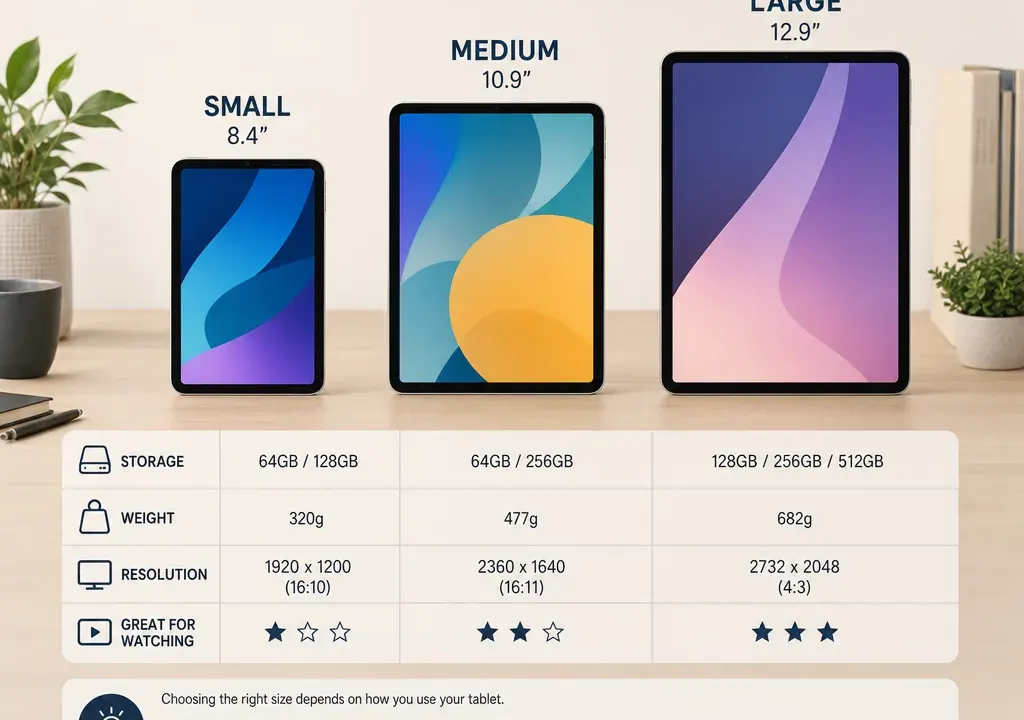
The best tablet size is not simply the biggest screen you can afford. An 8-inch model can be easier to hold for reading and travel, a 10 or 11-inch tablet often suits family browsing and streaming, while a 12-inch tablet makes more sense if you want a larger canvas for work, drawing or split-screen use.
When comparing Tablets, look beyond the headline discount. Retailer listings and catalogue specifications can tell you a lot about screen size, storage, memory, connectivity and value, but they should be read together. A cheaper tablet with limited storage may still be perfect for light use, while a larger model with more memory may be better value if it replaces a small laptop for some tasks.
This guide uses catalogue-style comparison thinking rather than physical product testing. The supplied examples include compact Amazon Fire HD 8 models, Samsung Galaxy Tab A11 and A11+ options, Lenovo’s Tab M11, Samsung’s 10.9-inch Tab S10 FE and an 8-inch Galaxy Tab Active5 listing, showing how real listings vary by screen size, storage and connectivity. Exact offers can change, so always compare the latest price and specification before buying.
Before comparing individual models, decide where the tablet will spend most of its time. A tablet used on a sofa for video, recipes and browsing can be larger than one carried daily in a bag. A child’s shared family tablet has different needs from a work note-taking device. A tablet for commuting should be easy to hold one-handed; a tablet for documents, drawing or multitasking benefits from extra screen space.
It helps to match the size to the main job. Choose compact if portability is the priority, mid-size if you want one device for most household use, and large if screen space matters more than hand-held comfort. Then compare storage, resolution, weight and price within that size group rather than jumping between very different types of tablet.
An 8-inch tablet is the compact choice. It is usually the easiest size to carry, hold for long reading sessions and pass around the home. It can suit ebooks, web browsing, shopping, casual streaming and children’s entertainment, especially when you do not need a large keyboard case or extensive multitasking.
The catalogue examples show how 8-inch Tablets often appear at the value end of the range. Amazon Fire HD 8 listings include 32GB and 64GB Wi-Fi versions, while Samsung’s Galaxy Tab Active5 8.0 listing shows that compact tablets are not limited to basic storage capacities, with a 128GB version appearing in the comparison set. This is a useful reminder: screen size does not tell you everything about storage or intended use.
For an 8-inch tablet, check storage carefully. A 32GB model may be enough for light app use and streaming, but it leaves less room for downloaded media and games than 64GB or 128GB options. If the listing mentions expandable storage, check the retailer’s specification rather than assuming it is included.
Resolution matters more than many shoppers expect on a smaller screen. A compact display can look perfectly adequate for casual use, but if you read a lot of text, compare the listed resolution and consider whether the screen is sharp enough for long sessions. Also check the weight in grams, because small differences are more noticeable when holding a tablet one-handed.
For many buyers, a 10 or 11-inch tablet is the most flexible option. It gives more room for video, browsing, schoolwork, recipes and video calls without feeling as large as a laptop-style device. If several people in a household will share one tablet, this size range is often easier to justify than a very small or very large model.
The supplied catalogue examples include Lenovo Tab M11 at 11 inches with 128GB storage, Samsung Galaxy Tab A11+ listings with 128GB storage and Wi-Fi or 5G variants, and Samsung Tab S10 FE at 10.9 inches with 128GB storage. Those examples show the kind of decisions you will face in this size bracket: not just which brand, but whether to prioritise storage, mobile connectivity, memory or a more premium specification.
This is where comparing offers becomes particularly important. A mid-size tablet with more storage and memory can sometimes look better value than a cheaper compact model if you expect to keep it for several years or use it for heavier apps. On the other hand, if the tablet is mainly for streaming and browsing at home, paying extra for mobile connectivity may not be necessary when a Wi-Fi model will do.
When comparing 10 and 11-inch Tablets, check the screen resolution, not only the diagonal size. Two tablets can be a similar size but feel different when reading small text or watching high-resolution video. Also look at weight, because a mid-size tablet that seems manageable on paper can feel less comfortable if you hold it for long periods rather than propping it on a stand.
A 12-inch tablet is for buyers who actively want a larger screen. It can make sense for drawing, note-taking, document review, sheet music, video editing, split-screen browsing or pairing with a keyboard. If your tablet will sit on a desk or be used with a case stand, the extra size can be useful.
The trade-off is portability. A larger tablet takes up more space in a bag, is less comfortable to hold for long reading sessions and may cost more once you factor in accessories. If you are choosing a 12-inch model, compare it against the laptop or Chromebook you might otherwise buy, not just against smaller Tablets.
Do not assume that a 12-inch screen automatically means a better viewing experience. The resolution and display quality listed by the retailer still matter. A larger screen can make low resolution more noticeable, so compare the pixel specification, brightness information if supplied, and whether the tablet’s storage and memory match the heavier tasks you plan to run.
Discount percentages can be useful signposts, but they should not decide the purchase on their own. A heavily reduced 8-inch tablet may be a strong buy for light entertainment, while a less dramatic offer on a 10 or 11-inch model may be better suited to schoolwork, family sharing or productivity. Compare the final listed price with the screen size, storage and connectivity you actually need.
In the supplied comparison set, compact Amazon Fire HD 8 models appear as low-cost 8-inch options, while Lenovo and Samsung models occupy a broader range of mid-size specifications. Samsung Galaxy Tab A11 and A11+ listings also show how Wi-Fi and 5G versions can sit differently in the market. These examples are useful for comparison, but offers can change, so treat current retailer listings as the source of truth when you buy.
A sensible value check is to ask: what am I getting for the extra spend? More storage, more memory, a larger or sharper screen, mobile connectivity, or a newer specification may be worth paying for. If none of those matter for your use, the simpler tablet may be the better choice.
Storage is one of the easiest specs to underestimate. A 32GB tablet can work for basic browsing, streaming and a modest selection of apps, especially if you do not store many downloads. A 64GB model gives more breathing room for apps, offline video and children’s games. A 128GB tablet is a safer choice for family use, study, media downloads and keeping a device longer. A 256GB listing, such as the Samsung Galaxy Tab S10 Lite example in the supplied set, is more relevant if you expect to store larger files, many apps or creative projects.
When comparing storage, also check whether the operating system and pre-installed apps reduce the usable space. Retailer listings may not always show usable storage clearly, so it is safer to buy more capacity if you know the tablet will be used heavily.
If two tablets are close in price, the model with more storage may be the better long-term choice. But do not pay for 128GB or 256GB simply because it sounds better if your use is mainly browsing, email and streaming.
Weight affects how often you reach for the tablet. For reading, browsing in bed or commuting, compare the listed weight in grams and remember to allow for a protective case. A tablet that is comfortable bare may feel different once a rugged case or keyboard cover is added.
Resolution affects clarity. If you will read magazines, documents, comics or small text, prioritise a sharper display. If the tablet is mainly for casual video and web browsing, the balance between price and resolution may matter more than chasing the highest figure. Always compare resolution alongside screen size, because a larger panel spreads pixels over a bigger area.
Connectivity is another decision point. Wi-Fi tablets are usually the straightforward choice for home use, while 4G or 5G versions can be useful for travel, field work or regular use away from reliable Wi-Fi. The supplied examples include Wi-Fi, 4G and 5G listings, which shows why it is important to compare like with like. A mobile-enabled tablet may cost more and may also require a suitable data plan, so include that in your decision.
Choose an 8-inch tablet if you want something compact, affordable and easy to hold. It suits reading, browsing, children’s use, travel and casual streaming. Compare 32GB and 64GB options closely, and look at 128GB if you want more room for downloads or apps.
Choose a 10 or 11-inch tablet if you want the best balance for most households. It is the size to consider for shared family use, video, recipes, online shopping, school tasks and general entertainment. Compare storage, memory and Wi-Fi versus mobile connectivity before focusing on the discount.
Choose a 12-inch tablet if you need the screen space for productivity, drawing, documents or replacing some laptop-style tasks. Check resolution, weight, accessory costs and storage carefully, because the larger size only pays off if you will genuinely use the extra display area.
Not necessarily. An 8-inch tablet can be fine for casual streaming, travel and children’s entertainment. If you watch films often or share the screen with someone else, a 10 or 11-inch tablet will usually feel more comfortable.
A 10 or 11-inch tablet is often the safest all-round choice because it balances screen space and portability. It suits browsing, video, recipes, shopping, schoolwork and shared family use without becoming as bulky as a larger model.
Choose more storage if you download apps, games, video or files. Choose a bigger screen if you mainly want easier viewing, drawing, document work or split-screen use. If your budget is fixed, storage often has a bigger effect on how long the tablet remains practical.
Only if you regularly use the tablet away from Wi-Fi. For home use, a Wi-Fi model is usually simpler. If you commute, travel or work on the move, compare mobile-enabled Tablets and remember to factor in any data plan costs.
Compare tablets within the same screen-size group first, then check storage, memory, connectivity, resolution and weight. A large discount is only useful if the specification fits your needs and the current retailer listing still represents good value.
The right tablet size depends on how you will actually use it. An 8-inch tablet is the portable, simple option; a 10 or 11-inch tablet is the flexible everyday choice; and a 12-inch tablet is worth considering when extra screen space is central to the job.
When browsing Tablets, compare current offers alongside the specifications that change daily use: storage, resolution, weight, memory and connectivity. A good deal is not just the lowest price or the biggest discount; it is the model that fits your routine without making you pay for features you will not use.
