
Loading buyer guide
Hurry, don't miss savings on selected furniture & more.* Shop all offers
New and refurbished tablet listings can look very similar at first glance. Here’s how to compare them properly, from storage and condition to warranty details and retailer availability.
Use our barcode scanner to match products instantly to find the best prices, find products with ease using our voice search and build wish lists and your favourites at the click of a button.
Best tablets for drawing and digital art
Digital art tablets vary far more than screen size and storage. For drawing, the key is whether the listing clearly confirms stylus support, pressure-sensitive pen compatibility and enough storage for your apps, brushes and exported artwork.
Tablet screen sizes compared: 8-inch, 10-inch or 12-inch?
Screen size changes how a tablet feels in your hand, how much storage matters, and whether paying extra for sharper resolution or more memory is worthwhile. Here’s how to compare 8-inch, 10-inch and 12-inch Tablets using retailer listings and catalogue specifications, without getting distracted by headline discounts alone.
Best Android tablets for everyday use
Everyday tablet shopping is less about chasing the highest specification and more about matching screen size, storage, RAM, software ecosystem and connectivity to how you actually use it. Here’s how to compare Android tablets and close alternatives in the Tablets range without overpaying for features you may not need.
Best tablets with a stylus
Stylus-friendly tablets can look similar on paper, but the buying decision often comes down to the pen itself: whether it is supported, included, comfortable to use and matched to the screen size you actually need.
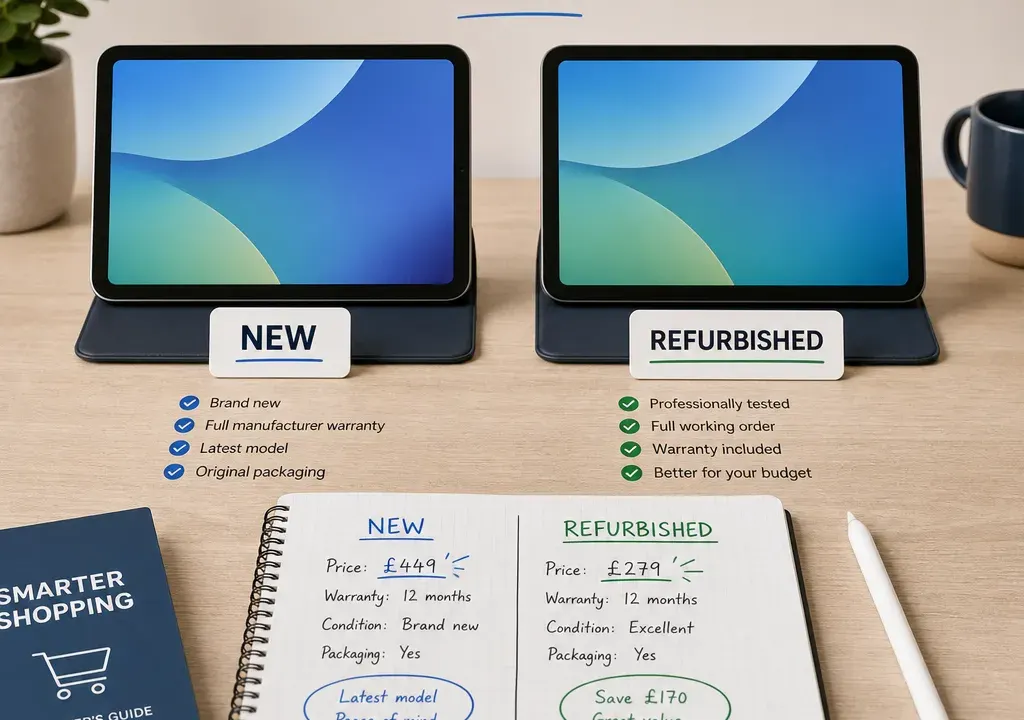
Buying a tablet is no longer a simple choice between the cheapest small screen and the most powerful premium model. In the Tablets category, shoppers often see new devices sitting alongside discounted, open-box or refurbished listings, and the better-value option depends on much more than the headline price.
A new tablet can make sense when the saving is strong, the model is current and you want a straightforward purchase. A refurbished tablet may be better when it gives you more storage, a higher-grade model or mobile connectivity for similar money. The important part is to compare like with like: condition, storage, model age, warranty information and retailer availability all matter.
Before comparing new and refurbished offers, decide the role the tablet will play. A tablet for streaming, browsing and schoolwork does not need the same specification as one for creative apps, multitasking or work travel.
For lighter use, compact tablets such as Amazon Fire HD 8 models may be attractive when the offer is strong, especially if the priority is casual viewing, reading or simple app use. For a larger everyday screen, examples such as the Lenovo Tab M11 or Samsung Galaxy Tab A11+ style listings sit in a different part of the market, with more emphasis on screen space and storage.
If you are replacing a laptop for some tasks, look more closely at memory, storage, accessories, operating system support and app compatibility. If you mainly want a family tablet, the better value may be the listing that is easier to manage, has enough storage and comes from a retailer with clear aftercare information.
Discount percentages can be useful as a quick signal, but they should not make the decision for you. In the supplied catalogue examples, there are new tablet listings showing large apparent reductions across brands including Amazon, Samsung and Lenovo. That can make a new device look very competitive against a refurbished alternative.
However, a discount only matters if the final offer suits your needs. A cheaper 32GB tablet may be a good buy for light use, but a 128GB or 256GB option could be better value if you will store downloads, photos, apps or work files. A refurbished higher-spec model can sometimes compete with a discounted new entry-level model, but only if the condition and warranty information are clearly stated.
When comparing products and offers, check the final basket cost, any delivery charges shown by the retailer, and whether the listing is in stock. A slightly higher-priced tablet from an available retailer with clearer information can be a safer choice than a vague listing with a larger advertised reduction.
For refurbished listings, condition should be one of the first details you read. Look for plain language about cosmetic wear, screen marks, battery condition where stated, included accessories and whether the tablet is boxed. If a listing simply says refurbished without explaining the condition, compare it cautiously against new options.
Condition grades are not always described in exactly the same way between retailers, so avoid assuming that one retailer’s grade means the same as another’s. Instead, read the full description and look for specifics. A refurbished tablet described with light cosmetic wear may still be good value, but a tablet with unclear screen or battery information needs more scrutiny.
New listings are simpler in this respect. For example, catalogue candidates such as the Amazon Fire HD 8 2024, Samsung Galaxy Tab A11 WiFi and Lenovo Tab M11 are presented as standard product listings rather than refurb examples in the supplied data. If a new listing is already heavily discounted, the refurbished alternative needs to offer a meaningful advantage to beat it.
Storage is one of the easiest areas to underestimate. A 32GB tablet can be enough for basic browsing and streaming if you do not keep many downloads, but it may feel restrictive if several people use it or you install lots of apps. Moving to 64GB, 128GB or 256GB often gives the tablet a longer useful life for everyday storage needs.
Among the supplied examples, the range spans from 32GB Amazon Fire HD 8 listings to 64GB, 128GB and 256GB Samsung options, plus a 128GB Lenovo Tab M11. That makes storage a genuine comparison point, not a small detail.
When weighing new versus refurbished, ask what you are getting for the same approximate spend. A refurbished 128GB tablet may beat a new 32GB model for app-heavy use, while a discounted new 64GB tablet may be the simpler buy if the price gap is small. If the tablet supports expandable storage, check whether that suits your intended apps and files, but do not rely on it as a complete substitute for built-in storage unless you know how you will use it.
Two tablets can look alike in a listing image but sit at very different points in their product life. A newer model may offer more up-to-date connectivity, software support potential or accessory compatibility, while an older refurbished model may offer a better screen, more storage or a higher original specification for less money.
Use model names and years carefully. A listing such as an Amazon Fire HD 8 2024 gives a clearer age signal than a product title without a year. The Lenovo Tab M11 example includes a 2023 reference, which also helps shoppers place it in context. For Samsung models, names such as Galaxy Tab A11, A11+ or S10 FE indicate different tiers and use cases, so do not compare them by price alone.
If the refurbished tablet is older, it should usually compensate with a lower price, better specification or clear warranty information. If it is only a small saving against a newer discounted tablet, the new listing may be the better-value choice.
Connectivity is another area where refurbished and new comparisons can get misleading. A Wi-Fi-only tablet is usually enough for home use, commuting with downloaded content or tethering to a phone when needed. A 4G or 5G tablet may suit travel, field work or frequent use away from Wi-Fi, but the tablet itself is only part of the cost consideration.
The supplied product candidates include Wi-Fi options as well as mobile-connectivity examples such as Samsung Galaxy Tab A11 4G and Galaxy Tab A11+ 5G listings. These are not interchangeable purchases. A mobile-enabled tablet can be better value for the right user, but unnecessary for someone who mostly watches video at home.
When comparing offers, separate the device value from any ongoing connectivity needs. If you do not need mobile data, a Wi-Fi model with more storage may be a stronger buy than a refurbished cellular model at a similar price.
Warranty information is especially important with refurbished tablets. You are not just buying a specification; you are buying confidence in the condition and the retailer’s aftercare. Look for clear wording about what is covered, how long support lasts and who provides it.
Do not assume all refurbished listings include the same level of cover. If warranty details are missing or hard to understand, factor that uncertainty into the comparison. A new discounted tablet from a retailer with clearer product information may be better value even if the upfront price is slightly higher.
For new tablets, still check the retailer information rather than assuming every offer is identical. Availability, returns information, included accessories and listing clarity can all influence the overall buying decision.
A strong deal is only useful if the product is actually available from a retailer you are comfortable buying from. The catalogue examples show tablet listings across several retailers, including OnBuy, John Lewis & Partners, Argos, Amazon, A1 Tech Deals, The IT Bay and esupply.co.uk. Availability can vary, so check the live listing before deciding.
If two tablets are close on value, the clearer listing often deserves priority. Look for a complete title, visible product image, storage and connectivity details, condition information where relevant, and transparent retailer terms. A listing with missing information may require extra checking before purchase.
It is also worth comparing several Tablets offers in one session. Prices, stock and promotions can shift, and refurbished availability may be more limited than new stock. Comparing products side by side helps you spot whether a refurbished listing is a genuine upgrade or simply a slightly cheaper older option.
A new tablet is often the stronger choice when the discount is meaningful, the storage is adequate and the model is recent enough for your needs. In the supplied data, examples such as the Amazon Fire HD 8 2024, Samsung Galaxy Tab A11 WiFi and Lenovo Tab M11 show how new listings can cover different budgets and use cases.
Choose new if you want the simplest buying experience, are buying for a child or family member, or do not want to interpret condition grades. New can also make sense when the refurbished saving is small, when the refurb storage is not better, or when the warranty information is unclear.
For many everyday shoppers, a well-priced new tablet with enough storage and the right screen size will be the most straightforward value choice.
Refurbished becomes more appealing when it lets you move up a tier without stretching the budget. That might mean more storage, a larger display, mobile connectivity, better accessories compatibility or a model that originally sat higher in the range.
It can also be a good option if the tablet is for a specific task and the condition is clearly described. For example, a refurbished tablet used mainly for reading, note-taking or home control does not necessarily need to look brand new, provided the screen, battery information and warranty details meet your expectations.
The key is to make the refurb earn its place. If it is older, has less storage, unclear condition and only a modest saving, it is not automatically better value. Refurbished works best when the trade-off is obvious and acceptable.
No. Refurbished tablets can be cheaper, but discounted new listings can sometimes be very competitive. Compare the final price, condition, storage, model age, warranty information and retailer availability before deciding.
For light browsing and streaming, 32GB or 64GB may be enough. If you download media, install many apps, share the tablet or want more room for files, 128GB or 256GB is usually more comfortable.
Choose Wi-Fi if you mostly use the tablet at home, work or school. Consider 4G or 5G only if you regularly need internet access away from Wi-Fi and are happy to factor in any separate connectivity costs.
Check the condition description, storage, exact model, included accessories, battery information where stated, warranty details and retailer availability. If these details are unclear, compare it carefully against a new option.
Sometimes, but not always. An older premium refurbished tablet may offer better specifications, while a newer budget tablet may be simpler to buy and more suitable for everyday use. The best choice depends on your priorities and the clarity of the listing.
The better-value tablet is the one that fits your use, not simply the one with the largest discount or the lowest price. New tablets are often the safer, simpler choice when discounts are strong and the specification is enough. Refurbished tablets can be excellent value when they offer a clear upgrade in storage, tier or connectivity, backed by transparent condition and warranty information.
When browsing Tablets, compare new and refurbished listings side by side. Check storage first, then model age, connectivity, condition, warranty information and retailer availability. If the refurbished option gives you a meaningful upgrade with clear details, it may be the smarter buy. If not, a discounted new tablet could be the better long-term decision.
