
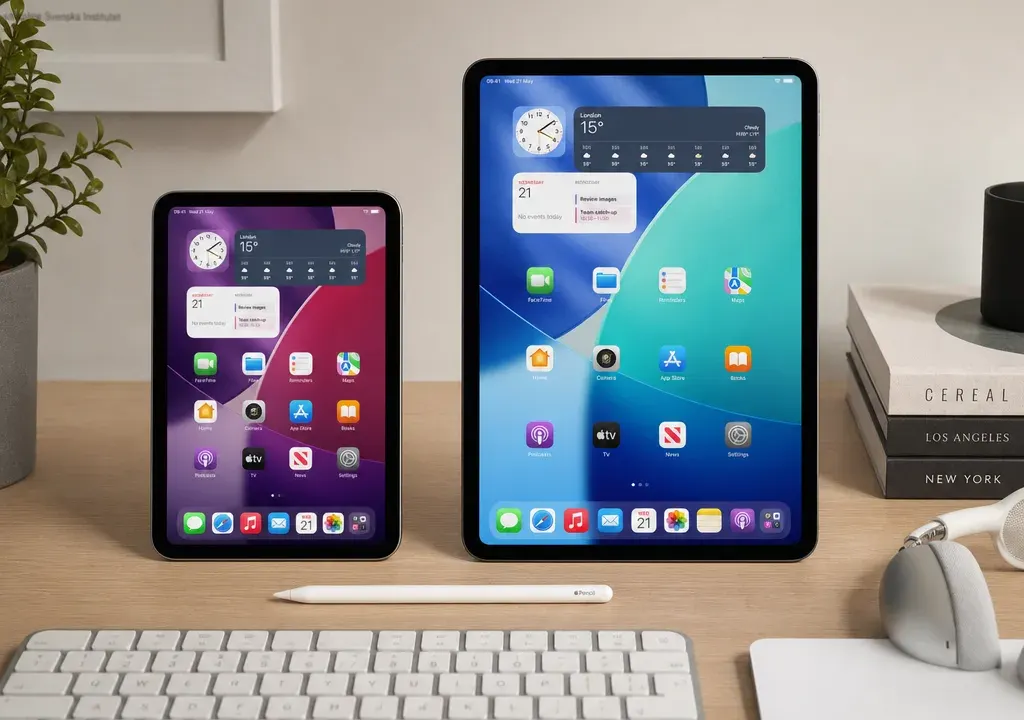
If you are deciding between an iPad mini and a standard iPad, start with the way you plan to use it. The iPad mini is the more portable idea: easier to hold, easier to carry and better suited to short bursts of reading, note checking and travel. The standard iPad gives you more screen space, which can make a real difference for video, browsing, documents, learning apps and family use.
The tricky part is that Apple tablet listings can vary by generation, storage size, connectivity and accessory compatibility. Two listings with similar names may not offer the same chip, charging port, Pencil support or keyboard options. Before you compare products and offers in Tablets, check the exact model details and the live price rather than assuming all iPad mini or iPad listings are equivalent.
Quick verdict: choose by where the tablet will live
Choose the iPad mini if the tablet will mostly live in your hand, bag or coat pocket. It is the more convenient format for commuting, travelling, reading in bed, checking recipes, managing smart home apps, casual gaming and quick browsing. If you already own a laptop or desktop for larger tasks, the mini can be a useful second screen rather than your main device.
Choose the standard iPad if the tablet will mostly live on a desk, sofa, kitchen counter or shared family space. The larger display is more comfortable for watching programmes, joining video calls, typing with a keyboard case, viewing schoolwork, editing documents and splitting attention between apps. For many households, the standard iPad feels like the safer all-rounder.
The best buy is not always the newest or most expensive listing. A higher-storage older model may be more useful than a lower-storage newer one if you download lots of apps, films or games. Equally, a Wi-Fi-only model may be better value if you mainly use the tablet at home.
Screen size: small convenience or larger comfort?
Screen size is the biggest everyday difference between iPad mini and iPad. The mini’s smaller display is easier to hold for long reading sessions and simpler to use one-handed. That matters if you use the tablet on public transport, while standing, or when you want something lighter than a laptop but bigger than a phone.
The standard iPad’s larger screen is more forgiving. Web pages, spreadsheets, learning apps, drawing canvases and video controls tend to feel less cramped. If the tablet will be used by children for homework, by adults for online shopping, or by more than one person watching together, the standard iPad is usually easier to live with.
When comparing listings, do not rely only on the product title. Check the display size shown in the specifications, because the practical jump from compact to full-size can change how you use the device every day.
Weight and portability: the underrated deciding factor
Weight is easy to overlook online, but it is one of the reasons shoppers prefer the mini. A smaller tablet is less tiring to hold for ebooks, long articles, digital notes or handheld gaming. It is also easier to pack with headphones, a charger and other everyday tech.
The standard iPad is still portable, but it is more of a sofa, desk or travel-bag tablet than a pocketable companion. If you often use a case, keyboard or stand, remember that accessories add bulk. A listing that looks only slightly bigger on screen may feel much less compact once protected in a case.
A useful test is to picture the tablet’s most common location. If you imagine holding it in one hand, the mini has the advantage. If you imagine propping it up or pairing it with a keyboard, the standard iPad makes more sense.
Storage options: do not buy only for today
Storage affects long-term satisfaction more than many buyers expect. Entry-level storage can be fine for streaming, web browsing, email and light app use, especially if you rely on cloud services. It can feel tight if you download lots of films, save large games, keep photos and videos locally, or use creative apps.
The iPad mini and standard iPad are often sold in different storage configurations depending on generation and retailer listing. Compare the actual storage stated on each product page, not just the model name. If two offers are close in price, the higher-storage option may be the better long-term value.
For a shared family tablet, extra storage is often worth considering because multiple users can quickly fill space with games, school files and offline video. For a travel tablet, storage also matters if you want entertainment available without reliable Wi-Fi.
Wi-Fi or cellular: when connectivity is worth paying for
Most shoppers will be well served by a Wi-Fi iPad mini or iPad if they mainly use the tablet at home, at work, at university, in hotels or in cafés. Wi-Fi-only models are often the simpler value choice because you avoid paying for mobile connectivity you may rarely use.
Cellular models are worth comparing if you regularly travel, commute, work on the move or need connection away from Wi-Fi. They can be convenient for navigation, field work, events, outdoor use and keeping children entertained on journeys, provided you are comfortable with any separate mobile data arrangement required.
When comparing offers, check whether the listing is Wi-Fi only or includes cellular connectivity. Similar-looking listings can differ on this point, and that can affect both the upfront price and the total cost of ownership.
Chip generation: why the exact model matters
Chip generation influences how responsive the tablet feels, how well it handles demanding apps and how long it may remain suitable for future software and app updates. A newer chip can be useful if you plan to keep the tablet for several years, use creative apps, play heavier games or multitask frequently.
That said, not every buyer needs the newest chip. For browsing, streaming, reading, email and video calls, an older but well-priced model may still represent good value if the specifications meet your needs. The key is to compare the generation and chip details shown in the listing, not just whether it says iPad mini or iPad.
If you are choosing for school, university or work, give chip generation more weight. If you are choosing a casual household tablet, screen size, storage and current offer may matter more.
Accessory compatibility: Pencil, keyboards and cases
Accessory support is one of the easiest areas to get wrong. Apple Pencil compatibility can vary by iPad generation, and keyboard support is not the same across every model. A bargain tablet may become less appealing if it does not work with the accessory you already own or the one you plan to buy.
For note-taking, drawing or marking up documents, check the exact stylus compatibility before buying. For typing, look at whether the iPad supports the keyboard style you want, or whether a third-party Bluetooth keyboard would be enough. Cases also vary by model size and generation, so avoid assuming that an older case will fit a newer tablet.
If accessories are central to your decision, compare the combined cost of the tablet and the accessories. A lower tablet price may not be the best deal if the compatible keyboard, Pencil or case pushes the total higher than a better-matched alternative.
Latest prices and offers: compare the whole listing, not just the discount
Tablet prices and promotions change, so treat current offers as a snapshot rather than a fixed rule. When comparing iPad mini and iPad listings, look at the live price, storage, connectivity, generation, condition, included accessories and retailer availability together.
A larger discount is not automatically better value. It may apply to a configuration that is less suitable for you, such as lower storage, Wi-Fi-only connectivity when you need cellular, or an older generation with accessory limitations. Equally, a modest-looking saving on the exact model you want can be the smarter purchase.
It is also worth comparing Apple listings against the wider Tablets category if you are open to alternatives. The main benefit is context: you can see how screen size, storage and connectivity affect value across the market before deciding whether an iPad mini or standard iPad is worth the extra spend for your needs.
Which should different buyers choose?
For commuters and frequent travellers, the iPad mini is usually the more natural fit. It is easier to carry, simpler to hold in tight spaces and well suited to reading, browsing and entertainment on the move.
For students, the choice depends on the work. If you mainly read notes, annotate documents and carry the device all day, the mini is appealing. If you type essays, view slides, join calls and use split-screen study workflows, the standard iPad is likely to feel more practical.
For families, the standard iPad is often the better shared device because the larger screen works well for video, games, learning apps and browsing. For younger children, durability, case choice and parental controls may matter as much as size.
For creative users, compare the exact screen size, chip generation, storage and Apple Pencil support. The mini can be excellent for sketching ideas and portable notes, while the standard iPad gives more room for drawing, editing and layout work.
For casual sofa use, the standard iPad is the safer default. It gives you a more relaxed viewing and browsing experience without stepping up to a laptop-sized device.
Frequently asked questions
Is the iPad mini better than the standard iPad?
It is better for portability, one-handed use, reading and travel. The standard iPad is usually better for larger-screen tasks such as streaming, typing, homework, browsing and shared family use.
Should I buy more storage on an iPad mini or iPad?
Consider more storage if you download films, keep lots of apps or games, store photos and videos locally, or share the tablet with family members. Lighter users who stream and use cloud storage may not need as much.
Is cellular worth it on an iPad?
Cellular can be useful if you regularly use the tablet away from Wi-Fi. If you mainly use it at home, work or places with reliable Wi-Fi, a Wi-Fi-only model is often the better-value option.
Can I use the same Apple Pencil with every iPad?
No. Apple Pencil compatibility varies by iPad model and generation, so check the exact listing and accessory details before buying.
What should I compare before choosing between iPad mini and iPad?
Compare screen size, weight, storage, Wi-Fi or cellular connectivity, chip generation, accessory compatibility and the latest live offers. The model name alone is not enough to judge value.
Conclusion
The iPad mini is the better choice if portability is the priority. It suits buyers who want a capable tablet that is easy to carry, comfortable to hold and ideal for reading, travel and quick everyday tasks.
The standard iPad is the better all-rounder if you want more screen space for entertainment, study, typing, family use or creative work. It is less compact, but usually more comfortable for longer sessions.
Before you buy, compare the exact iPad mini and iPad listings side by side in Tablets. Focus on the configuration you will actually use, then weigh the latest price against storage, connectivity, generation and accessory costs. That is the simplest way to spot the offer that is genuinely right for you.
