
Loading buyer guide
Hurry, don't miss savings on selected furniture & more.* Shop all offers
iPad and Fire tablets suit different buyers. Here’s how to weigh app stores, budgets, storage, accessories and retailer availability before comparing live tablet offers.
Use our barcode scanner to match products instantly to find the best prices, find products with ease using our voice search and build wish lists and your favourites at the click of a button.
Best tablets for drawing and digital art
Digital art tablets vary far more than screen size and storage. For drawing, the key is whether the listing clearly confirms stylus support, pressure-sensitive pen compatibility and enough storage for your apps, brushes and exported artwork.
Tablet screen sizes compared: 8-inch, 10-inch or 12-inch?
Screen size changes how a tablet feels in your hand, how much storage matters, and whether paying extra for sharper resolution or more memory is worthwhile. Here’s how to compare 8-inch, 10-inch and 12-inch Tablets using retailer listings and catalogue specifications, without getting distracted by headline discounts alone.
Best Android tablets for everyday use
Everyday tablet shopping is less about chasing the highest specification and more about matching screen size, storage, RAM, software ecosystem and connectivity to how you actually use it. Here’s how to compare Android tablets and close alternatives in the Tablets range without overpaying for features you may not need.
Best tablets with a stylus
Stylus-friendly tablets can look similar on paper, but the buying decision often comes down to the pen itself: whether it is supported, included, comfortable to use and matched to the screen size you actually need.
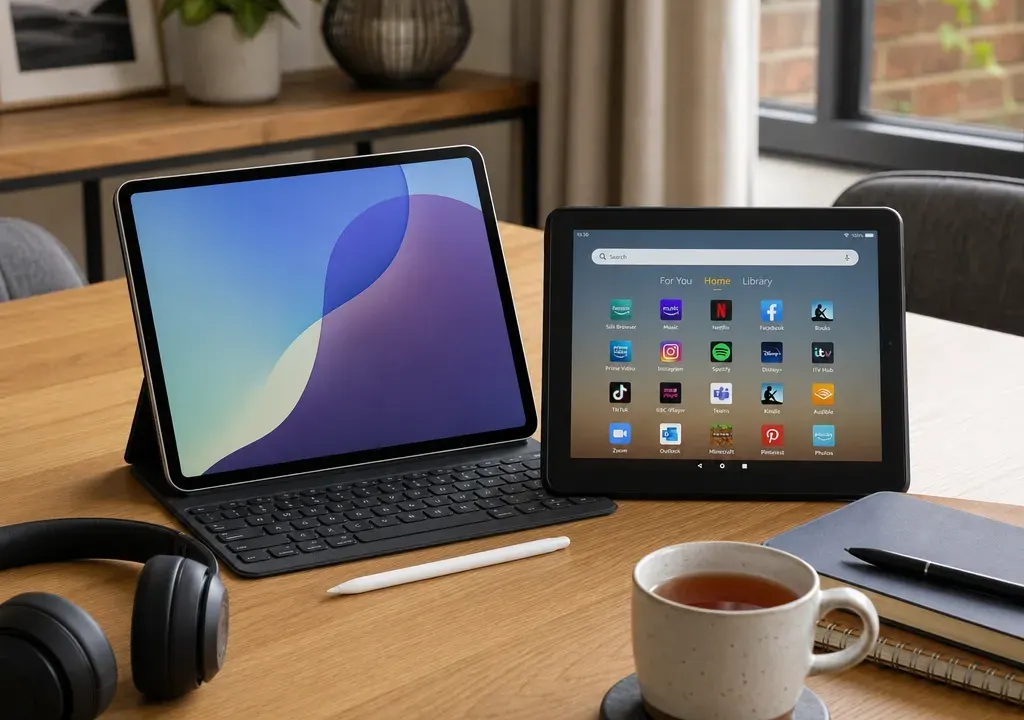
Apple iPad and Amazon Fire tablets can look similar at a glance: both are slim touchscreens made for streaming, browsing, reading and light everyday tasks. The real difference is the ecosystem around them. Your choice affects which apps you can install, how easily you can share purchases with family, what accessories are available and how much you are likely to spend.
For many UK shoppers, the Fire range is attractive because it often appears in lower price bands, especially in compact sizes such as the Fire HD 8. iPad models usually sit higher in the market, but bring Apple’s wider app ecosystem, longer accessory support and closer integration with iPhone, Mac and iCloud users.
The most important difference is the app ecosystem. iPad uses Apple’s App Store and iPadOS, which generally gives you access to a broad selection of tablet-optimised apps for creativity, education, productivity, note-taking, video editing, games and streaming. If you already use an iPhone, Apple Watch or Mac, an iPad also fits neatly into the same account, photo, message and cloud setup.
Amazon Fire tablets use Amazon’s own software based on Android, with apps provided through the Amazon Appstore. They are well suited to Amazon services such as Prime Video, Kindle, Audible and Alexa. They can also cover familiar basics such as web browsing, email and streaming, depending on the apps you need.
Before comparing prices, write down your essential apps. If you need a specific banking app, school app, workplace tool, drawing app or game, check availability on the relevant store. A cheap tablet is poor value if it cannot run the one app you bought it for.
In ShopSmarty product data, Amazon Fire HD 8 models appear as clear budget-focused options, with 32GB and 64GB versions commonly used as entry points for shoppers who want a tablet for streaming, reading, browsing and casual apps. Catalogue examples also show Fire tablets appearing across mainstream UK retailers, which makes it worth comparing retailer offers rather than assuming one seller is always cheapest.
iPads tend to be positioned differently. They are usually considered when the buyer wants stronger app choice, a larger range of accessories, more demanding games, creative work, handwritten notes, school use or a tablet that will be shared with other Apple devices. The upfront spend is often higher, so the decision should be based on how often the tablet will be used and whether the extra ecosystem benefits matter to you.
If the tablet is mainly for occasional sofa browsing, children’s videos or Kindle reading, a Fire tablet may be enough. If it is replacing a small laptop for study notes, creative apps, photo work or daily productivity, an iPad is usually the more flexible comparison point.
Fire HD 8 models in the catalogue show why compact tablets remain popular. An 8-inch class screen is easy to hold for reading, travel, children’s use and streaming in bed. It is also less bulky to carry in a bag, which can matter if the tablet is mainly a portable entertainment device.
iPads are commonly chosen in larger screen sizes, although the exact size depends on the model and generation. A larger display is more comfortable for split-screen working, documents, drawing, video calls, sheet music, magazines and watching films with subtitles. It can also feel less cramped if you are using a keyboard case.
Think about where the tablet will live. For a commuter bag or child’s backpack, compact can be a strength. For a kitchen worktop, study desk or sofa-sharing screen, a larger tablet may be more enjoyable.
Storage is one of the easiest places to underbuy. Some Fire HD 8 catalogue examples come in 32GB and 64GB versions. The lower capacity can suit light use, especially if most viewing is streamed and the tablet is not loaded with large games. However, downloads, apps, photos and system files can quickly reduce usable space.
A 64GB tablet is often a more comfortable starting point for family use, travel downloads and a wider mix of apps. Higher storage options may be worth considering if the tablet will hold offline films, games, creative projects or school files.
When comparing iPad and Fire listings, do not compare only the headline model name. Check the storage capacity, whether the model supports expandable storage, and whether the retailer listing includes the exact configuration you want. Two tablets that look similar in search results may not be equivalent once storage is considered.
Accessories can change what a tablet is useful for. iPad is the stronger option if you want a wide choice of keyboard cases, styluses, stands, protective cases and creative accessories. It is also the more obvious route if handwriting notes, drawing or regular typing are central to the purchase. Always check compatibility by exact model and generation, because accessories are not universally interchangeable.
Fire tablets are typically simpler: protective cases, screen protectors, stands and basic Bluetooth accessories are the main considerations. That is enough for many buyers, particularly for streaming, reading and family use. If you want a tablet that mostly stays in a case and is handed around the house, the simpler accessory market may be perfectly adequate.
Do not ignore accessory cost when comparing offers. A lower tablet price can look less compelling if you immediately need to add a case, stylus, keyboard or extra charger. Equally, do not pay for an iPad-focused setup if you only need a screen for Prime Video, Kindle and light browsing.
ShopSmarty catalogue data shows Amazon Fire tablets listed through multiple UK retailers, with examples including Fire HD 8 configurations in different storage sizes and model years. That matters because retailer availability can affect the live offer, the configuration shown, and whether the product page is for the newest or an older version.
For iPads, the same rule applies even more strongly. The model name, generation, storage capacity, connectivity and accessory compatibility all affect value. A cheaper iPad listing may be an older generation, a lower storage version or a different connectivity option from the one you had in mind.
When using Tablets comparison pages, open similar-looking offers side by side and check five details before deciding: generation or release year, screen size, storage, Wi-Fi or mobile connectivity, and what is included in the box. This helps avoid comparing a budget Fire tablet with a more capable iPad as though they are direct substitutes.
Although this comparison focuses on Apple iPad and Amazon Fire, the wider Tablets category also includes Android alternatives from brands such as Samsung and Lenovo. ShopSmarty product candidates in the same comparison set include Samsung Galaxy Tab and Lenovo Tab models across different screen sizes, storage capacities and connectivity options.
These can be useful middle-ground choices if you want access to Android apps without choosing Amazon’s Fire ecosystem, or if you want a larger screen and more storage while keeping an eye on value. They are not automatically better or worse than iPad or Fire; they simply give you another route to compare based on apps, display size, storage and retailer availability.
If your shortlist is not settled, compare Fire, iPad, Samsung Galaxy Tab and Lenovo Tab options by use case rather than brand loyalty. A reading tablet, a child’s entertainment tablet and a study tablet may all point to different best-fit choices.
Choose an Amazon Fire tablet if you mainly want a lower-cost device for streaming, Kindle reading, browsing, casual games, Alexa features and family entertainment. It is especially appealing if you already use Amazon services and do not need specialist apps.
Choose an iPad if app choice, creative tools, school or work use, note-taking, accessory support and integration with other Apple devices matter more than paying the lowest possible upfront price. It is usually the safer choice for buyers who expect the tablet to do more over time.
Keep comparing products and offers until you are looking at like-for-like specifications. A Fire HD 8 32GB, a Fire HD 8 64GB and a larger iPad are not simply three prices for the same thing; they are different levels of storage, screen space, app access and long-term flexibility.
It depends on how you will use it. An iPad is usually better for app choice, productivity, creative work and Apple device integration. A Fire tablet can be better value for streaming, reading, browsing and simple family use.
Not always. iPad uses Apple’s App Store, while Fire tablets use Amazon’s Appstore. Many everyday services may be available, but you should check your essential apps before buying.
Light users may manage with 32GB, especially for streaming and reading. For families, offline downloads, games and longer-term use, 64GB or more is often a safer choice. Always compare the exact storage capacity in each listing.
They can suit children’s entertainment, reading and simple apps, particularly where budget matters. Check the specific model, parental control options, case availability and app requirements before choosing.
Yes, if you are not tied to Apple or Amazon. Samsung Galaxy Tab and Lenovo Tab models can offer alternative screen sizes, storage options and Android app access, so they are worth comparing in the wider Tablets category.
The iPad versus Fire tablet decision is really an ecosystem decision. Fire is often the value-led route for entertainment, reading and Amazon services. iPad is the more flexible platform for apps, accessories, productivity and Apple households.
Before buying, compare live Tablets offers by exact model, storage, screen size, connectivity and retailer availability. The best choice is not the brand with the loudest reputation; it is the tablet that fits your apps, budget and everyday habits.
