
Loading buyer guide
Hurry, don't miss savings on selected furniture & more.* Shop all offers
Before comparing suction figures or discounts, look at how each robot finds its way around your home. Navigation affects cleaning routes, app controls, room selection and how much intervention you will need.
Use our barcode scanner to match products instantly to find the best prices, find products with ease using our voice search and build wish lists and your favourites at the click of a button.
Self-emptying robot vacuums compared
Self-emptying docks can make a robot vacuum cleaner far more convenient, but they also add cost, bulk and ongoing consumables. The smartest buy is not always the most feature-packed model; it is the one whose dock, bags, dimensions and retailer offer fit your home and budget.
Shark vs Eufy robot vacuums
SharkNinja and Eufy appeal to slightly different robot vacuum buyers: Shark is often worth shortlisting when you want a more appliance-like set-up with hands-off emptying, while Eufy is strong for shoppers comparing compact, app-controlled models and value-led offers.
Dreame vs Xiaomi robot vacuums
Dreame and Xiaomi robot vacuums can look similar on paper, but the better buy depends on mapping, mop maintenance, dock automation and the offer available from UK retailers.
Best kettles for hard water areas
Hard water can leave scale around the spout, base and filter of a kettle, so the smartest choice is usually the model that is easiest to fill, descale and inspect rather than simply the one with the lowest ticket price.
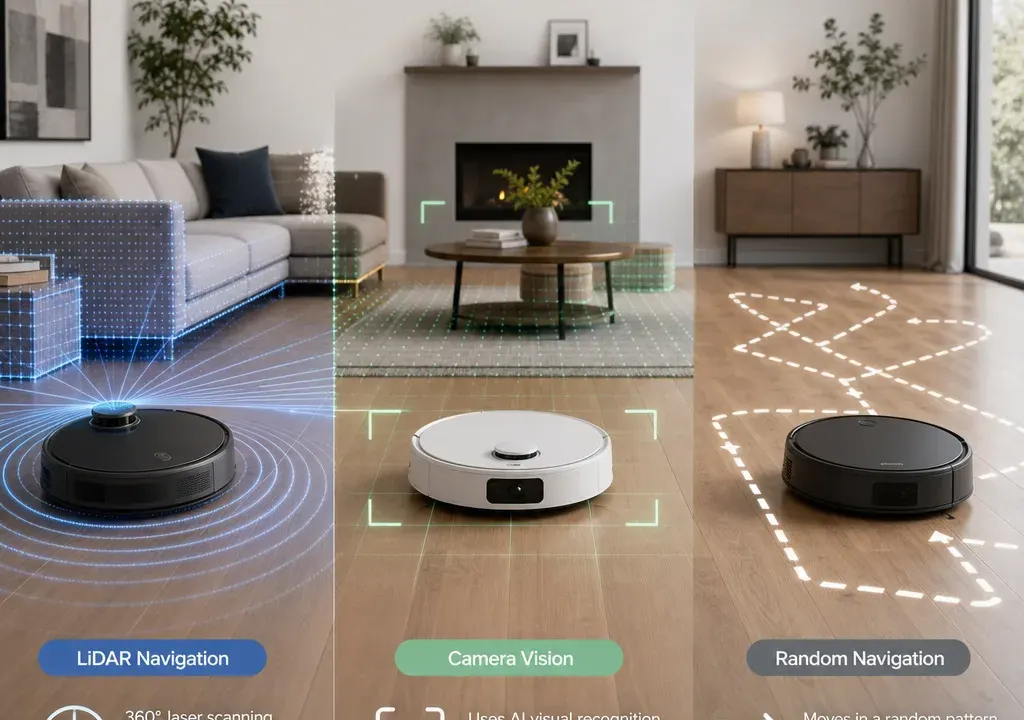
The way a robot vacuum navigates is not just a technical detail. It affects whether the cleaner moves in neat lines or bounces around, whether it can remember your rooms, and whether you can tell it to avoid the dog bowls, cables or a play mat.
For many shoppers comparing Robot Vacuum Cleaners, navigation is a better starting point than headline suction alone. Strong suction is useful, but a robot that cannot reliably cover the right areas may still be frustrating day to day.
LiDAR, camera navigation and random navigation all describe how a robot works out where it is. The best choice depends on the layout of your home and how much control you want from the app.
If you simply want a low-cost robot to keep one open-plan area tidier between deeper cleans, random navigation may be enough. If you want the vacuum to clean the kitchen after dinner, avoid a rug, or split a floor plan into rooms, you should focus on models that clearly advertise mapping and room controls.
Before shortlisting, decide whether you need three things: reliable mapping, no-go zones and room selection. If those features are essential, do not assume they are included just because a robot is described as “smart” or app-controlled. Check the product description and app feature list.
Random-navigation robot vacuums usually move until they meet an obstacle, then change direction. Some can still be scheduled or controlled by an app, but they typically do not offer the same level of map-based control as more advanced models.
The advantage is value. In the supplied catalogue data, several lower-priced options sit in the budget end of the Robot Vacuum Cleaners range, including brands such as Lefant, Liectroux, Olsen & Smith and Sodial. These can be worth comparing if your main priority is a low entry price rather than advanced mapping.
The trade-off is predictability. A random-navigation model may clean acceptably in a small room, but it can take a less efficient route and may struggle to give you confidence that every area has been covered. It is also less suitable if you want to send the robot to a specific room or create a digital boundary around a problem area.
Choose this type if you have a compact flat, a straightforward floor layout, limited clutter and realistic expectations. Avoid it if your home has several rooms, lots of chair legs, narrow transitions or areas you often want the robot to avoid.
Camera-based robot vacuums use visual information to help navigate. Depending on the model, this may support more structured cleaning routes, map creation or obstacle awareness. However, camera navigation is not one single feature set, so it is important to compare what each model actually offers.
Some shoppers like camera-based systems because they can support smarter movement than basic random cleaning. The possible drawback is that performance can depend on conditions in the home, such as lighting, contrast and how the software interprets objects. You should also check the privacy and camera settings explained by the manufacturer if that matters to you.
Do not assume that a camera automatically means object recognition, room selection or no-go zones. Those features need to be listed clearly. A camera model without strong app controls may be less useful than a LiDAR model with a well-developed map, even if the two sit in a similar price band.
Camera navigation can be a sensible middle ground for buyers who want more intelligence than a basic model but do not necessarily need the most advanced mapping system. Compare the app screenshots, map controls and retailer descriptions closely.
LiDAR robot vacuums use laser-based scanning to help build and update a map of the home. In practical buying terms, this is the navigation type most shoppers associate with detailed floor plans, systematic routes and stronger app-based control.
If you want to split the map into rooms, clean selected areas, set virtual boundaries or run the robot in a particular zone, LiDAR models should be high on your shortlist. The key phrase is “should be”: the technology makes these features possible, but the final feature set still depends on the individual product and app.
LiDAR is especially worth considering for medium to larger homes, multi-room layouts and households where you want the robot to become part of a routine. For example, you may want it to clean the hallway in the morning, the kitchen after meals and the living room while you are out.
The drawback is cost. LiDAR and advanced mapping features often appear higher up the range, particularly when combined with mopping, self-emptying docks or premium brand ecosystems. In the supplied catalogue context, higher-priced candidates include models from Samsung, MOVA and Dreame, while established robot vacuum brands such as iRobot and Eufy also appear in the comparison set. The point is not that every model from these brands uses LiDAR, but that brand, features and offer level should be compared together.
Once you know the navigation type, compare the mapping features line by line. The most useful feature for many homes is room selection. This lets you ask the robot to clean one room rather than the entire floor, which is far more convenient for everyday spills and high-traffic areas.
No-go zones are another important feature. They can help keep the robot away from cables, pet bowls, delicate furniture, low-clearance areas or children’s toys. Check whether no-go zones are set digitally in the app, require physical boundary strips, or are not supported at all.
Also look for zone cleaning, multi-map support if you have more than one floor, map editing, scheduled room cleaning and the ability to name rooms. These are the features that turn a robot vacuum from a general gadget into something you can fit around your routine.
Be cautious with vague wording. “Smart navigation” can mean many things. “Mapping” may mean a temporary cleaning map rather than a saved editable map. “App control” may only mean start, stop and scheduling. When comparing Robot Vacuum Cleaners, the exact app functions matter as much as the sensor hardware.
At the budget end, expect simpler navigation and fewer map controls. These models can still be useful, but you are generally buying convenience and light maintenance rather than precise automation. If a very low-cost listing claims a long feature list, check the description carefully and compare retailer information before relying on it.
Around the lower mid-range, you may see a mixture of basic app-controlled models, hybrid vacuum-and-mop designs and occasional stronger navigation features. The supplied product candidates include several models around the value-focused part of the market, including Eufy, Eureka and Vexilar options. Compare what is actually included rather than judging by discount percentage alone.
Higher price bands tend to bring more advanced navigation, fuller mapping features, stronger docking systems or extra mopping functions. A premium model may be worth paying for if it genuinely reduces daily intervention, but it is easy to overbuy if you only need a robot for one room.
The safest approach is to set a feature-led budget. Decide the minimum navigation feature you need first, then compare offers within that band. A random-navigation bargain is not a bargain if you will stop using it, while an expensive LiDAR model is unnecessary if your home is small and open.
The supplied catalogue data shows a broad mix of brand options across Robot Vacuum Cleaners, including Eufy, iRobot, Samsung, Dreame, MOVA, Eureka, Lefant, Liectroux, Vexilar, Olsen & Smith and others. That spread is useful because it lets you compare both well-known names and value-led alternatives.
Availability matters because robot vacuums are not just one-off purchases. You may want replacement filters, mop pads, dust bags, brushes or support information later. Before choosing a lesser-known or heavily discounted model, check what consumables are included and how easy they appear to replace.
Retailer availability can also influence the decision. Compare what is in the box, returns information, warranty wording, delivery options and whether the retailer listing clearly explains the navigation features. A slightly clearer listing can be more useful than a larger-looking discount if it helps you buy the right model.
Do not compare only the sale badge. Compare the navigation type, saved mapping, no-go zone support, room controls, dock type, included accessories and ongoing consumables. That is the fairest way to judge value.
Choose random navigation if your budget is tight, your space is simple and you mainly want a helper for regular surface dust and crumbs. It is the least precise option, but it can be good enough for straightforward rooms.
Choose camera navigation if you want smarter movement than a basic model and the listing clearly explains the mapping or object-aware features you care about. Treat it as a model-by-model decision rather than assuming all camera systems behave the same way.
Choose LiDAR if you want the strongest chance of useful mapping, room selection and digital no-go zones. It is the most compelling option for multi-room homes, more complex layouts and buyers who want the robot to follow a routine with minimal fuss.
If you are undecided, prioritise saved maps and no-go zones over raw suction figures. Navigation is what determines whether the robot cleans the right place at the right time.
LiDAR is often the stronger choice for mapping and room-by-room control, but the better buy depends on the exact model. Check whether the robot supports saved maps, digital no-go zones and room selection rather than relying on the navigation name alone.
They can be worth buying for smaller, simpler spaces and tighter budgets. They are less suitable if you want precise routes, editable maps or the ability to send the robot to a specific room.
No. Mapping and no-go zones are separate features. A robot may create a cleaning map without letting you edit it or set virtual boundaries, so always check the app feature list before buying.
Room selection is worth paying for if you want targeted cleaning, such as the kitchen after cooking or the hallway after muddy shoes. If you only plan to clean one small open area, it may be less important.
Compare bin capacity, dock features, mop functions, replacement consumables, height clearance, retailer information and the accessories included. Navigation is crucial, but overall value depends on the complete package.
Navigation technology is the feature that shapes how a robot vacuum behaves in real life. Random navigation is the budget-friendly option for simple jobs, camera navigation can add intelligence when the feature set is clear, and LiDAR is usually the best route to serious mapping control.
When comparing Robot Vacuum Cleaners, start with the rooms you need cleaned and the controls you will actually use. Then compare products and offers within that feature band, checking availability, app functions and what is included before you commit.
